Saturday, November 11, 2006
Ask the Reader: What do you want to see on DA?
Give us your tips, questions, and any other suggestions you may have in the comments below.
Labels: Technology


How to Get Songs OFF your iPod
Here's the short version: If you try to teach a customer a lesson, you've just done two things:Of course, it doesn't seem to have hindered the popularity of iPods.
a. failed at teaching a lesson
and
b. lost a customer
There are software approaches to moving songs off an iPod, which are simpler for most users, and ways that require a little modification of your folder settings.
 YamiPod is a handy tool that lets you manage your iPod under Windows, Mac, and Linux. It has a lot of features and is available in 28 languages.
CNet has a short tutorial for Windows that doesn't involve new software that essentially treats an iPod as an external hard drive and has to do with showing hidden files. The Mac tutorial is here.
Update: Wired has short reviews of several other iPod rippers including Senuti, iPodRip, and iPod Access.
Labels: Technology
Blue Screen of Death Screensaver
Admittedly, I was a little scared when I first loaded it up since it does look real. Especially with the monitor problems I've had recently.
Blue Screen Screensaver
Labels: Technology
ChaCha: Human Powered Search
 ChaCha uses live search guides (people) to help you find what you're looking for. Apparently, these guides get paid $5-10 an hour. While this might appear to be a coup for natural language search, ChaCha is a really horrible search engine.
First, because the search results are misleading and inaccurate. Sponsored listings are hard to distinguish from actual search results (the top 5 results are sponsored links, but they're numbered just like regular results). Although it looks like their ad inventory isn't filled up yet, so sponsored links only appear for certain searches.
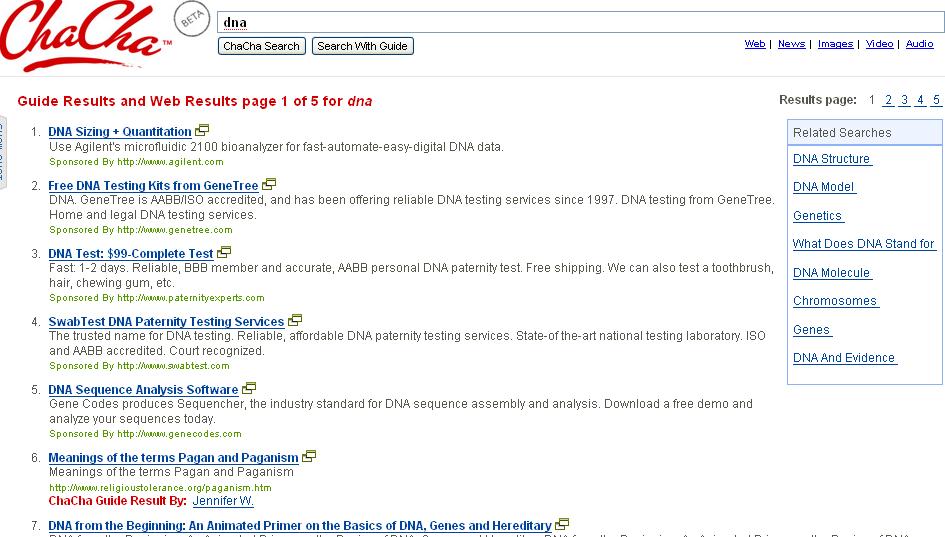 Second, the results are skewed. Guide results are given too much weight so when do a search for Google you get "distance from earth to sun" as your first result. Similarly, a search for DNA gives you a site on paganism as your first real search result (#6). This might get ironed out as more searches are conducted, but right now a search guide has a lot of power over a page's ranking.
Still, it might be fun to check it out and have one of the guides help you through a search. You can chat with guides while they do a search, and later rate their performance.
ChaCha
Labels: Technology
How to Boost the Range of your Wireless Keyboard/Mouse
I bought a really cool wireless media center keyboard with an onboard trackball mouse, so I diden't need to sit at a table with a mouse, mousepad and a keyboard while enjoying my media center. The plan was that i would be able to relax in my sofa while surfing the internet by using this clever unit.Improve the range of your wireless keyboard or mouse
But oh no! On the cardboard box there was written that the range of the keyboard should be up to 5 meters, but it was at best 2 meters. Not long enough to be used as I intended.
Then I noticed something on the cardboard box. On a sticker there was written that the keyboard used the radiofrequency of 2.4 ghz. That's the same as wireless LAN!!!
[via Make]
Labels: Technology
Friday, November 10, 2006
VirtualCity brings Street-Level Photography to Maps
 If you were impressed by Microsoft's Virtual Earth 3D, you might be even more amazed by VirtualCity, which takes maps to a much finer level. It's a massive project whose goal is to collect street-level photographs of every Canadian city. Right now, Toronto has been completed. Using some rather sophisticated gadgets, these photographs
are collected via mobile communication centers equipped with high-definition video cameras and the latest in global positioning technology. GIS-grade GPS, accelerometers to sense increases and decreases in acceleration, and gyro meters to sense directional changes, all tie into the vehicles’ computer bus to sense each full rotation of the wheels, while custom software compares these readings 10 times per second to create extremely accurate location data regardless of degraded GPS or "urban canyons.”There are a couple of ways to navigate: you can enter an address, use the viewer, or use the map. Using the viewer, you can "walk" down a street and see photographs of what's there step-by-step. It's sort of like taking a virtual tour of a city. You can also easily bookmark locations to return to later.
The project is very ambitious, and it'll be interesting to see how well it scales.
VirtualCity
Labels: Technology
Wink makes stalking so much easier
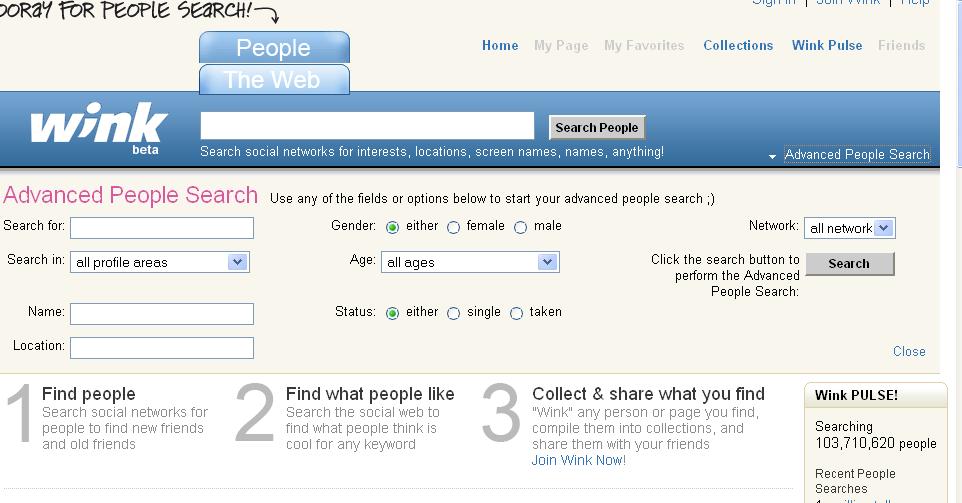 Potential stalkers out there will rejoice at Wink's People Search feature, which indexes profiles from MySpace, Bebo, and LinkedIn. Stalkees who quit one service to escape to another can no longer hide quite so easily. Searches can be narrowed down by age, gender, location, network, and relationship status.
But, seriously, Wink is really diversifying by going into the social networking search market. About a month ago, I asked when the first attempt to aggregate social networking profiles would occur, and Wink's effort goes a long way towards that goal. For instance, a prospective network could use Wink's People Search engine to identify users' profiles across three different social networks and bring them together into one common interface. Users could then post to all the different networks they are a part of and keep track of comments and shoutouts easily from one page (a sort of social networking portal if you will).
Interestingly, Wink indicates that it is searching 103,710,620 people, but how can it tell that it's not double- (even triple-) counting?
I think the potential here is huge, especially with the splintering of users into various niche social networks. Of course, one of the reasons for that is that users want to segregate their social networking ties. They want to keep their MySpace network contained to MySpace, and their Facebook friends on Facebook. So this development won't be welcomed by many users. One solution is to have a sort of robots.txt file that users can put on their profiles so Wink and future competitors will know to ignore them.
Wink
Labels: Technology
Simple Trick to Get a Live.com Email Address
1. Go to this page and click Sign Up.
2. Copy the following:
javascript: var p = 'live.'; var ds = new Array('com', 'cn', 'fr', 'it', 'nl'); for (var i = 0; i < ds.length; i ++){document.getElementById('idomain').options[i] = new Option(p + ds[i], p + ds[i])} alert('domains added'); 3. Paste what you copied in part 2 into the address bar and hit Enter. 4. Now choose the domain you want and complete the rest of the form.
Update: No longer works.
[via wBeta]
Labels: Technology
Finding Lost Keys with Google?
In the future we may be able to find lost keys with a simple google search. Science fiction writer Bruce Sterling imagines how physical objects will be part of the internet as they become trackable in space and time. Bruce discusses the theoretical and technical challenges that we face as we try and think about and develop the Internet of Things.The Internet of Things
......
Much of the talk deals with the concept of using verbal framing devices to manifest an idea. Bruce introduces us to the idea of a spime, objects that are trackable in space and time. Spimes are material instantiations of an immaterial system, digitally manufactured things from virtual plans.
(via Google Blogoscoped)
Labels: Technology
Exalead: Right Brain Search Perfection
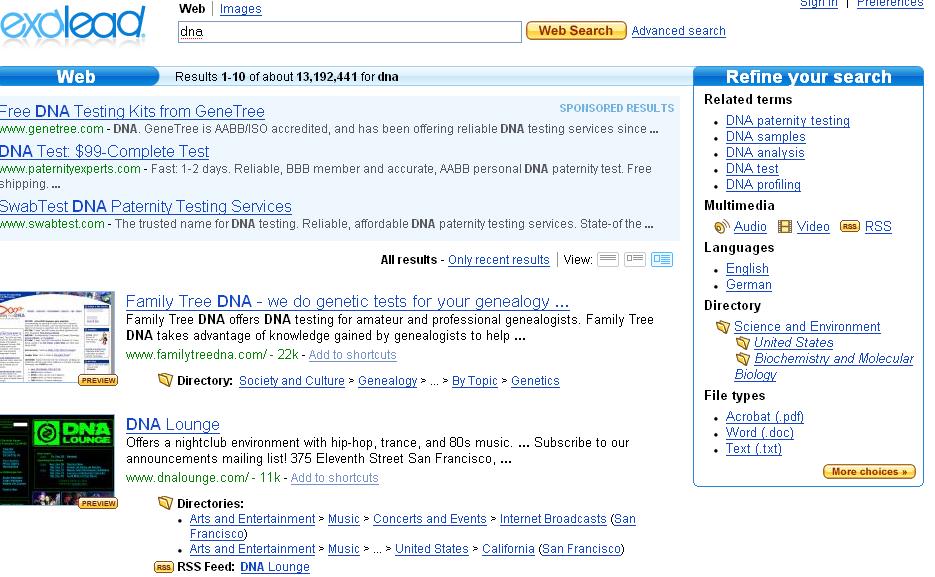 Exalead is a search engine that takes right brain search (i.e. combines text and images to help users find what they're looking for) to a new level. It has an array of very impressive features that make the search process a lot easier. Search results can be viewed in three different ways: text, text+ website thumbnail, and text+thumbnail+extra info. The last option shows you how a site is categorized in a directory and also displays an RSS feed if one is available.
 However, what's really cool is the side panel that lets you refine a search. When you click on More choices at the bottom, you'll see an expanded list of refinement options. For instance, it'll show you a list of languages and the percentage of search results that they occupy, and let you narrow results down that way. A search for DNA shows that 83% of pages are in English with 3% in German and so on. Not too surprisingly, 78% of the files indexed are in PDF format. You can also filter results by country and date. Another neat option I really like is the ability to narrow results down to sites with RSS feeds.
While some of these features are available in Google, Exalead makes them very easy to access. Its use of Ajax makes the UI very responsive and fluid which makes working with these tools a lot easier. I'm seriously considering replacing Google with Exalead, at least for research purposes.
Exalead
Labels: Technology
44% of you hate social networking
 While the sample was small (48 votes total), it's a surprisingly good turnout given that most users of any site aren't active participants. The poll reflects some of my own qualms about social networks since the current crop don't do a good job of facilitating real relationships. If you do find social networking working well for you, it's likely despite the poor design of those sites. A term I've come across is "low emotive bandwidth", which I think sums it up really well. It's hard to communicate online via text, which is why you get people using emoticons and other ways of getting around the bandwidth problem.
Labels: Technology
Omnidrive: Online Storage Aggregator
 Omnidrive is yet another online storage company offering 1GB of space, but it has the advantage of a superior UI. You can access it via a web interface or through a Windows or Mac client. Calling itself an online storage aggregator, Omnidrive lets you to store, share, and publish video, music, and other types of content in one place (which isn't really that different from any other storage service). Files can be shared publicly via a public URL or privately with select users. There's also a built-in music player.
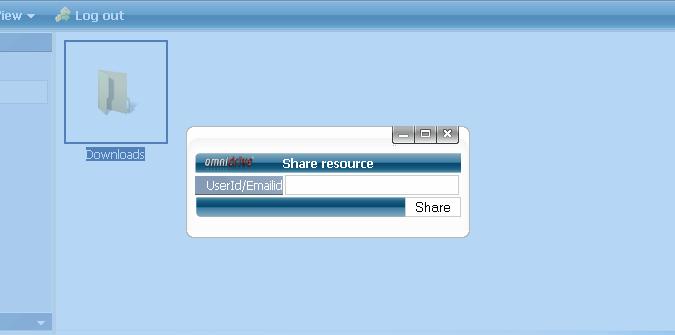 The UI is interactive and works well, which is a plus. You can view files in a thumbnail view so it's similar to working with files on your computer, and there are other drag-and-drop features to upload and share files that might be enough to entice users to sign up. To sign up, you'll need to enter invitation code: web2con.
If you want more storage space, AOL's Xdrive offers 5GB.
Omnidrive
Labels: Technology
Thursday, November 09, 2006
Get Paid for Getting Spam with Boxbe
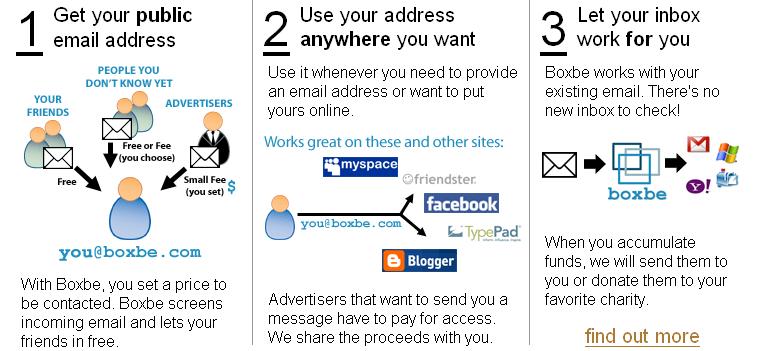 Boxbe has an interesting proposition for you: sign up for a Boxbe address (mine is: alchemist@boxbe.com), use it as a throwaway address for dubious sites, and get paid when someone sends you spam. The sender has to either pay a fee or complete a CAPTCHA in order for the email to actually reach you. Normally a losing proposition for spammers, but for mass mailing campaigns, they might find it worthwhile to pay for access.
 You get to set the price for what senders have to pay to reach you (mine is $.75), which you get a percentage of. Donating to charity automatically is also an option. Now you might actually look forward to spam.
Boxbe
[via GigaOm]
Labels: Technology
Save Time with Paste and Go (Firefox)
 Paste and Go is a Firefox extension that adds an extra option to, well, Paste and Go when you paste a URL in the address bar. No need to hit the Go button anymore. It actually replicates a function found in Opera that I found very helpful once I trained myself not to instinctively hit the Go button.
Paste and Go
Labels: Technology
Download: Google Reader Notifier (Mac)

Troels Bay has written a Google Reader Notifier widget that displays unread items in your account. It's Mac only so I haven't tested it out.
[via]
Labels: Technology
RSS Shopping Site Roundup
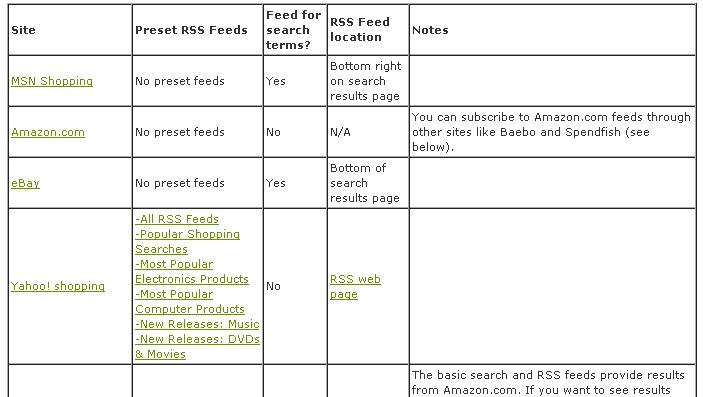
Well ahead of the holiday shopping season, Getting Finances Done has compiled a list of shopping sites that offer RSS feeds. Sites include Yahoo Shopping, Javadeals.com, Shop.com, and a lot of coupon and discounts sites.
If you want to mass import them into your RSS feed reader, I'd suggest using OPMLBuilder. Just paste in the post URL and delete any links without feed or RSS in it. Then generate the OPML file and import it into your reader.
RSS Shopping Site Guide
Labels: Technology
Free Voice Messages with BrainCast
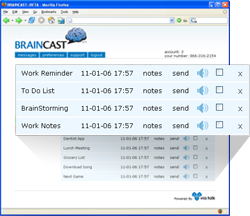 BrainCast looks like an interesting service. Users can record personal notes for later retrival. Essentially, it's a free voicemail service. All you need to do is dial a toll-free number and record your message. You can retrieve the message by checking your email later.
As the FAQ explains:
BrainCast is intended to be used as a service to help store and organize audio notes from anywhere. Anytime you think of something where you don’t have a simple method of writing something down or making a note of it, like at the store, or in the car, or out at night, is an optimal time to use the service. Just call, wait for the beep, record, and it will be home and on your computer when you get there.BrainCast
Labels: Technology
Test Drive Microsoft Photosynth
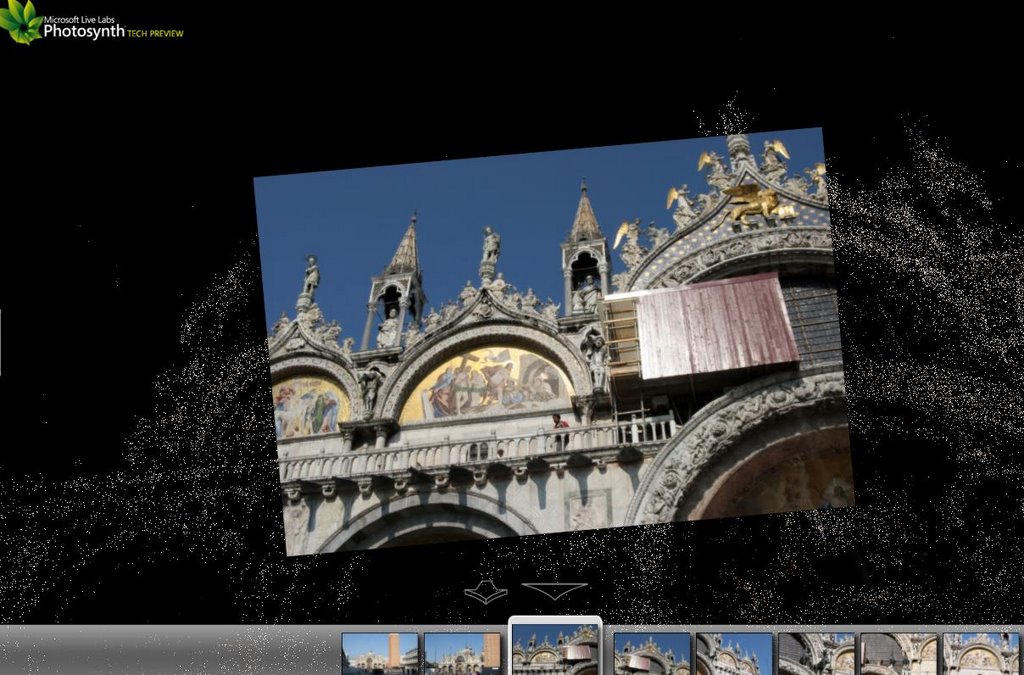 Microsoft has really been on a 3D kick lately, first with Virtual Earth 3D and now with a demo of Photosynth, its attempt to take photos 3D. How do they do it?
 Our software takes a large collection of photos of a place or an object, analyzes them for similarities, and then displays the photos in a reconstructed three-dimensional space, showing you how each one relates to the next.
In our collections, you can access gigabytes of photos in seconds, view a scene from nearly any angle, find similar photos with a single click, and zoom in to make the smallest detail as big as your monitor.After testing it out, I have to say that Photosynth is very cool. There's a neat flying effect when you zoom in on details of a picture. A Fly Around button lets you swoop around a 3D reconstructed image. There a lot of potential, but hopefully this product doesn't require 20-30 photos to work like PictureCloud.
The broad details remind me of Cooliris' PicLens product (Mac only) that creates an immersive photo viewing experience, but Photosynth is much more advanced.
Photosynth (Internet Explorer only)
Labels: Technology
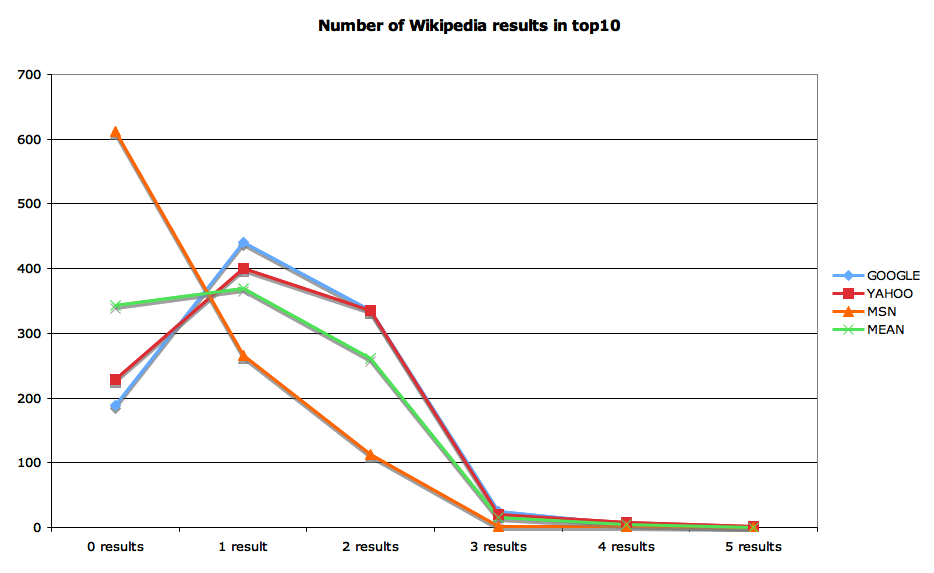
Wikipedia's High PageRank
However, spammers often attempt to get their sites listed in Wikipedia to take advantage of their high PageRanks. Google must really believe in the ability of Wikipedia's editors to detect spam and quickly deal with it.
[via]
Labels: Technology
Create your own audiobooks
Users may Extract Text from files or use the Reading Room function. The Extract Text feature uses optical character recognition (OCR) to convert scanned images to text. DocMorph's Reading Room allows users to create audio files that may be "read back" to the user using the computer's soundboard and speakers.Using DocMorph is a little complicated since you have to register and use Internet Explorer, but it's useful for the visually impaired or if you're just tired of reading so much.
DocMorph
Labels: Technology
50 Gmail Invites to Give Out
Once you've signed up, you might find these articles helpful:
Use Gmail Generate Unlimited E-mail Addresses
Make Gmail your Default E-mail Program
Labels: Technology
How to Reduce Clutter on your Desktop
1. One way to reduce clutter is to think about what files you've accessed in the past two weeks and move those into a folder called, for example, Working. All other files can go into a folder called Archive. If you have a lot of files, you might just sort them by date modified and put into the appropriate folders that way. Be sure to actively delete what you don't need.
2. An extreme approach is to completely empty your desktop of all icons. To do this, right-click on the Desktop, go to Arrange Icons By, and uncheck Show Desktop Icons. Now only the wallpaper should be showing. This can be helpful if you want to see your pretty wallpaper, or if you want to fill your desktop with useful widgets displaying the weather, RSS feeds, or what have you.
 3. Another approach is to put a dropdown Desktop menu on your taskbar. All you have to do is right click on the Taskbar, go to Toolbars, and select Desktop. Now you can quickly scroll through the Desktop menu to find what you're looking for.
 4. As for a more conservative approach, most of the time, you won't access applications through desktop shortcuts so you can feel free to delete them. Then you'll only be left with icons like My Computer, Recycle Bin, and whatever other files and folders you find useful.
None of the four options I've mentioned is mutually exclusive so you might choose to implement some in sequence and see what combination works best for you.
What ways have you found to deal with clutter?
Labels: Technology
Wednesday, November 08, 2006
Stikkit Brings Post-it Notes to the Web
 I've been tracking the progress of Stikkit, a new organizational tool, after coming across the interesting "values of n" (the creators of Stikkit) blog. Now that it's launched, I like what I see. Stikkit takes sticky notes digital. You can easily jot down events you want to remember, keep track of email addresses, and create to do lists.
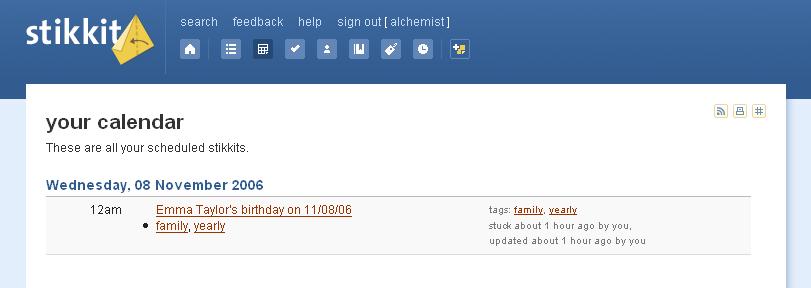
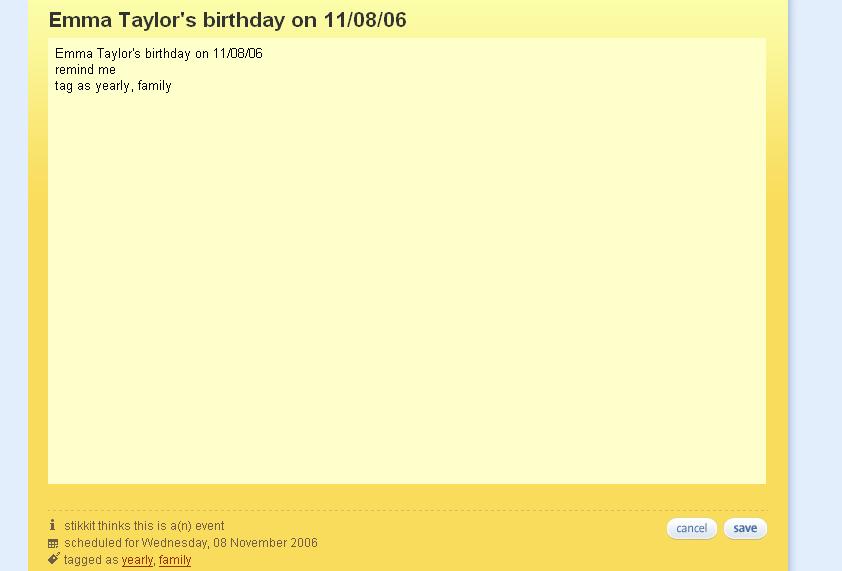 The input system is natural language-based. So Stikkit interprets "http://21st.blogspot.com Digital Alchemy" as being a link with Digital Alchemy as the title and adds it to your bookmarks. As another example, entering "John Smith's birthday on 11/08/06, remind me, tag as birthday" will cause Stikkit to create an entry in your calendar, set a reminder, and tag the note with birthday.
  You can also take Stikkit with you via a handy bookmarklet that fills in details of a site you're browsing and lets you save it to Stikkit.
Although the concept isn't original, Stikkit has a good UI and a familiar looking yellow Post-it note-look that may allow it to gain traction.
Stikkit
Labels: Technology
Social Media Creation with Exclaimable

Exclaimable is a little hard to categorize. You can create media ranging from videos to text, and easily share them. For instance, you can record a video if you have a webcam hooked up and easily embed it on your blog or site. The Flash-based interface is very basic with big, colorful buttons.
Even something like the picture creator only has three settings that can be changed: color, tone, and size. That's it. You can't really create anything fancy. Most "masterpieces" will be very crude, but the saving grace is that Exclaimable is a very easy way to create media online.
Uploads aren't allowed; Exclaimable isn't an editor. It's a content creator. You can also see what other people have created in the gallery, and filter creations based on popularity and views.
Exclaimable
[via]
Labels: Technology
Helipad: A Web-based Notepad
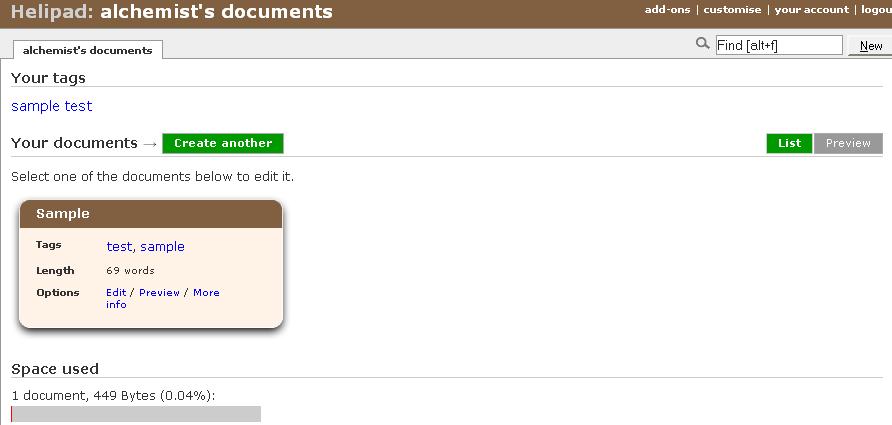
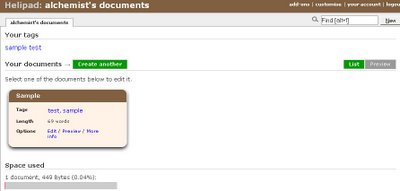
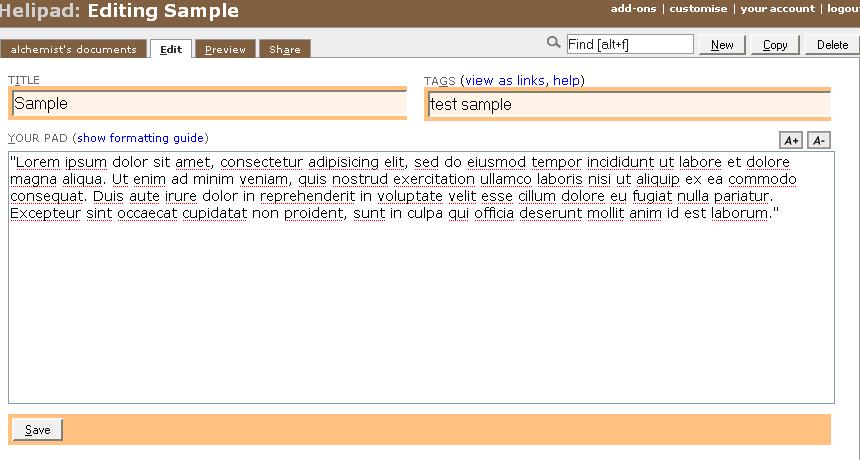 Helipad is basically a web-based version of Notepad. You can quickly jot down notes or lists, tag them, and search through your documents. Its main attraction is the ability to publicly share documents.
Although there is a lot of competition in this area from Google Docs and Spreadsheets to online organizers like Scrybe, the simple UI is a plus. Helipad doesn't try to add extra features that detract from the user experience. It's just a notepad.
Helipad
 Technorati Tags:
 Labels: Technology
How to pick a lock

Locksport International has a comic book guide to lockpicking. Through simple step-by-step panels, you'll learn the components of a lock and how to manipulate them to pick a lock. It's available online or in PDF format.
Though it has a bad reputation, lockpicking's especially useful when you forget your keys, and don't want to spend the night out in the cold. Remember to only pick locks you own, or have permission to pick.
Announcing the LSI Guide to Lockpicking
[via]
Labels: Technology
Google's Orkut Open to Public
Orkut is mostly popular in non-English speaking countries like Brazil and India, but maybe this latest move will see it get more competitive with MySpace and Facebook.
Join Orkut
Labels: Technology
Like.com: Shopping and Style via True Visual Search
 Like.com is a site that combines celebrity style, image pattern recognition, and commerce to create an explosive combination. Unlike traditional image search engines like Google Images, which find images based on metadata, Like.com calculates a digital signature for each image and compares your search query to that signature to find similar images.
The celebrity factor is highly emphasized with stars like Britney Spears, Tyra Banks, Paris Hilton, and Tom Cruise prominently featured. If you happen to like that watch Paris Hilton is wearing, then you can easily do a likeness search on it and purchase it from Like.
Text searches are also supported. For example, a search on "Gucci handbags" returns a list of handbags that you can then do a Likeness Search on.
 You can select what aspects of the picture appeal to you like color, shape, or pattern, and draw a box around an area of the image that you want to focus on.
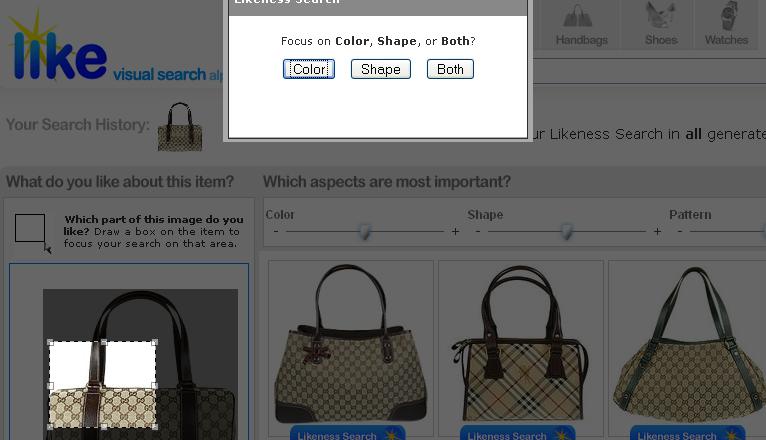 If you decide to focus on both color and shape, you get these results.
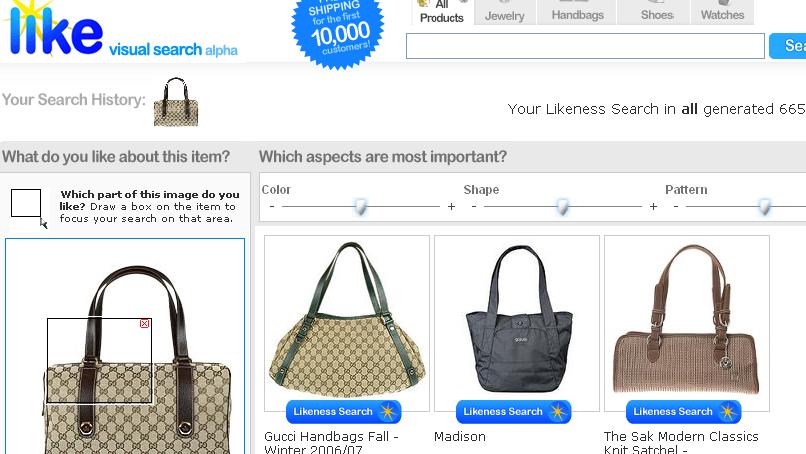 In the future, image uploads will be available so you won't be dependent on Like's inventory of images.
Like's potential is huge. I can easily imagine people flocking online as they watch the Academy Awards to find out what dress Angelina Jolie was wearing or what brand shoes Katie Holmes was sporting.
Like
Labels: Technology
P2P Goes Mobile with Symella/SymTorrent
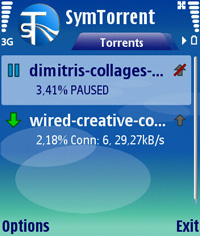 Researchers at the Budapest University of Technology and Economics have released two awesome P2P clients for cell phones. The two apps are surprisingly full featured.
Symella is a Gnutella client for Symbian smartphones.
It is capable of searching and downloading, but do not upload any data in its current release. It supports multi-threaded downloads which means that if multiple users have a particular file then Symella can download the file from several locations simultenously.Another option is SymTorrent, which is a Bittorrent client for Symbian phones.
It supports downloading multiple torrent files at the same time, is capable of both downloading and uploading and can save the status of your unfinished torrents, so you can resume the downloads after restarting the application. You can also check the status of each file inside a torrent along with several other statistics and properties during download.With the release of more MP3 cell phones, this could really take off.
Symella
SymTorrent
[via]
Labels: Technology
Microsoft's Virtual Hard Drive Spins Up
Using the power of virtual machines, you can now quickly evaluate Microsoft and partner solutions through a series of pre-configured Virtual Hard Disks (VHD). You can download the VHDs and evaluate them for free in your own environment without the need for dedicated servers or complex installations.Windows Server 2003 R2, Exchange Server 2007, and SQL Server 2005 are available for download.
VHD
[via]
Labels: Technology
Quickly Create OPML Files from RSS Feeds
 Feedshow's OPMLBuilder is a quick and easy way to create an OPML file that you can import into your favorite RSS reader. OPML files are basically lists of RSS feed URLs that you can export from one reader into another so you don't have to laboriously re-enter RSS URLs one at a time if you decide to switch to a different reader.
You'll find OPMLBuilder very helpful when you see a page containing dozens of RSS feeds, and you don't want to input them one at a time. All you need to do is enter the page's URL into OPMLBuilder and select which RSS URLs you want to include in your OPML file. For instance, Yahoo! News has dozens of RSS feeds on one page, and you can quickly create an OPML file out of them. Then import the OPML file into your feed reader.
Personally, I collect a lot of RSS feeds while browsing, and OPMLBuilder is a quick way to import them all at once instead of as I find them.
Feedshow also offers revenue sharing if you decide to syndicate your blog's content through them. All you need is a Google Adsense account.
OPMLBuilder
Labels: Technology
US Presidential Speeches Tag Cloud
 Chirag Mehta has created a neat tag cloud based on US Presidential speeches. A neat slider lets you scroll through speeches from 1776 to 2006 and see what how word usage changes over time.
A very cool way to see the important issues of the day. Some presidents emphasized slavery and others less exciting topics like imports and exports.
US Presidential Speeches Tag Cloud
Labels: Technology
Tuesday, November 07, 2006
The Half Life of Caffeine; Plus Death by Caffeine Calculator

With rising popularity of energy drinks (supermarket shelves contain dozens of different brands), exactly how much caffeine can you safely consume? Caffeine-centric blog Energy Fiend has the answer.
Use the death by caffeine calculator to see how many cans of Red Bull or Coke you can drink before keeling over. If you're a real caffeine addict, you can use these two pieces of information to figure out a caffeine dosing schedule to keep your body at peak caffeine levels without overdosing (Note: Not Recommended).Caffeine takes a certain amount of time to work through your system. One study some years ago showed that the half-life of caffeine in healthy adults is 5.7 hours (see source). This means if you consume 200mg of caffeine at mid-day, you would still have 100mg in you at around 5.45pm.
The same study showed that people with compromised liver function had a significantly longer half-life (a 49-year-old woman having alcoholic hepatic disease had a serum half-life of 168 hours).
Labels: Technology
Getting health insurance without spending an arm and a leg

Stealth startup Wesabe's blog has a good analysis for how to keep health insurance costs down. Health insurance is a bit of a nightmare to understand with many esoteric terms that you never come across ordinarily. Here's a good glossary if you need it.
Wesabe has put together a useful Google Spreadsheet that compares three possible scenarios and their impact on insurance costs:
- The good life: how much would each plan cost me if I had no health expenses?
- A moderately bad year: how about if I had $2,500 in expenses?
- Hit by a bus: finally, what if I had a big disaster, and had $25,000 in expenses?
How does my $1,500-deductible plan compare to the $500-deductible plan? In “the good life” scenario, by taking the higher deductible, I’ll save $888 over the next year. If I have a “moderately bad year,” I’ll still save $118 over the year. Things only work out worse for me if I get “hit by a bus” — but even in that case, I only lose $112.Getting health insurance without spending, ahem, an arm and a leg
Labels: Technology
Cameron Diaz in Yahoo Japan Commercial
[via]
Labels: Technology
MySpace Claims Band URL for Fox TV Show
"Losing our URL was a complete surprise to us," Bones singer/bassist Michael Miller said yesterday. "We logged on one day and found David Boreanaz staring back at us. It sucks because we've used that URL for almost two years to build our band name and fan base, and it's on all of our product and posters. We're as indie as it gets and can't afford to reprint everything."After an outpouring of outrage,
"Tom" wrote the band, saying, "I heard about what happened with your URL. I gave it back to ya...Sorry about that! As we grow in size, sometimes people make decisions I don't know about. This was obviously the wrong decision. The Bones URL is yours once again. :-) "Tom deigned to give the page back, but the incident really highlights that MySpace is really now NewsCorpSpace.
[via]
Labels: Technology
Election Day: Political Ads on Google; Who Do Googlers Support?

The Rimm-Kaufman Group did a study of political ads appearing in search results for names of Senate candidates. Using Firefox with cookies disabled, they found very few political ads on Google and none on Yahoo. Other findings:
- There are few political advertisers: the average search results page for queries in this study returned only 3.7 ads.
- The most prevalent advertisers within this query set were Accoona (search engine), Gather.com (social networking), CafePress (retailer), and GOPSenators.com (National Republican Senatorial Committee).
- "Red" ads (pro-Republican or anti-Democrat) outnumbered "blue ads" (pro-Democrat or anti-Republican) two-to-one.
- Blue ads were three times more likely to be negative than red ads.
In related news, it looks like Googlers predominantly support Democrats.
[via]Two years ago, Googlers gave $130,000 to various Democratic presidential candidates and the party. This year, they gave over $255,000 to the same. The biggest earner in 2004 was John Kerry, with over $80,000; this year he got $363.
Two years ago, Googlers gave $3,250 to re-elect the President. This year, they gave George W. Bush no money, but gave other Republicans $5,200.
Labels: Technology
Microsoft Virtual Earth 3D is Live

In the ongoing battle to see who can be the more innovative, Microsoft is pulling ahead of Google in the maps arena by launching 3D maps. Currently, Virtual Earth 3D only covers 15 cities including San Francisco, Atlanta, and Boston. To get the best experience, you'll need a speedy broadband connection to load the extremely detailed image layers.
Don't be surprised if while flying over your city of choice, you see noticeable billboard ads. The ads are much more detailed than the satellite imagery so they stand out.
You'll need to download a setup file and be using Internet Explorer to view the 3D maps.
Virtual Earth 3D
Labels: Technology
Monitor Your Internet Addiction with PageAddict

I mentioned two Firefox extensions previously that monitor how long you've spent online, but PageAddict is a far superior alternative. Apparently written by two neuroscientists in Cambridge, Massachusetts, PageAddict keeps tabs on where and how long you browse and presents it all to you in a very neat table. The table breaks down how much time you spend at each site and even lets you tag sites (say, you can use labels like work, school, and play). You can also limit the time you're allowed to spend on sites with a given tag.
There are lots of uses for this. If you're a parent, you can limit how long your children spend on non-educational sites. Or, if you happen to be an Internet addict, you can add one more barrier between you and sweet bliss.
PageAddict is a lot smarter than other extensions since it can tell which tab is active, but this can cause overcounting if you leave your browser window open and in front while going on a break.
PageAddict
[via]
Labels: Technology
Simple online picture editing with Snipshot

Snipshot is a lightweight browser-based picture editor. Funded by Y Combinator, it allows you to do basic editing tasks like crop, resize, and rotate pictures. There's also a one-click enhance option that makes pictures look better. Once you're done, you can export to Flickr or save your picture as a PNG, TIF, JPG, GIF, or even PDF. Pictures up to 10 MB can be uploaded.
The features are on par with what you could get in Microsoft Paint, but if you somehow don't have access to Paint (say, if you're using a library or Internet cafe computer), Snipshot is an excellent alternative. The UI is actually more intuitive than Paint's.
There's also a bookmarklet you can use to import pictures from a web page into Snipshot.
Snipshot
Labels: Technology
How well do you know your Web 2.0 Logos?
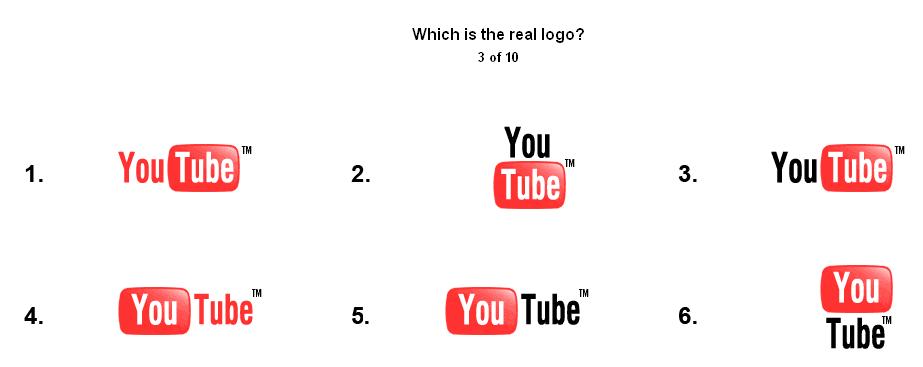
You see the YouTube logo everyday, but which one of the logos above is the real deal? (Answer below) Guess the Logo is betting you can't complete its 10 part logo recognition game without a hitch. The logos are so similar to each other that even seasoned users of Amazon, Flickr, or IMDb might not be able to tell which one is legit.
After playing the game, I'm a little embarrassed to admit to getting some of them wrong, but it did teach me to be more observant in the future. A warning: Google is probably the hardest one with its alternating colored letters.
Guess the Logo
Answer: number 3
Labels: Technology
FeedBurner Adds Widgets for Blog RSS Feeds
FeedBurner has teamed up with SpringWidgets to allows users to publicize their RSS feeds in widget form so readers can directly read the latest headlines on their desktops. It's a neat tool, and you can customize it a little by adding your blog's logo. You can activate the SpringWidget Skin service under the Publicize tab of your FeedBurner account.
 SpringWidgets is part of Fox Interactive Media's attempt to dominate the emerging widget space. Widgets are easily shared, and Fox's ownership of MySpace gives it a big edge over the competition as far as getting widespread adoption of the SpringWidgets platform.
A sample widget showing Digital Alchemy's RSS feed is below. If you want to add it to your desktop, click on the green icon at the upper right corner. You have to have the SpringWidgets engine installed first though (Windows only).
Labels: Technology
Monday, November 06, 2006
Jellyfish Smack Deals: Dutch Auctions Go Retail
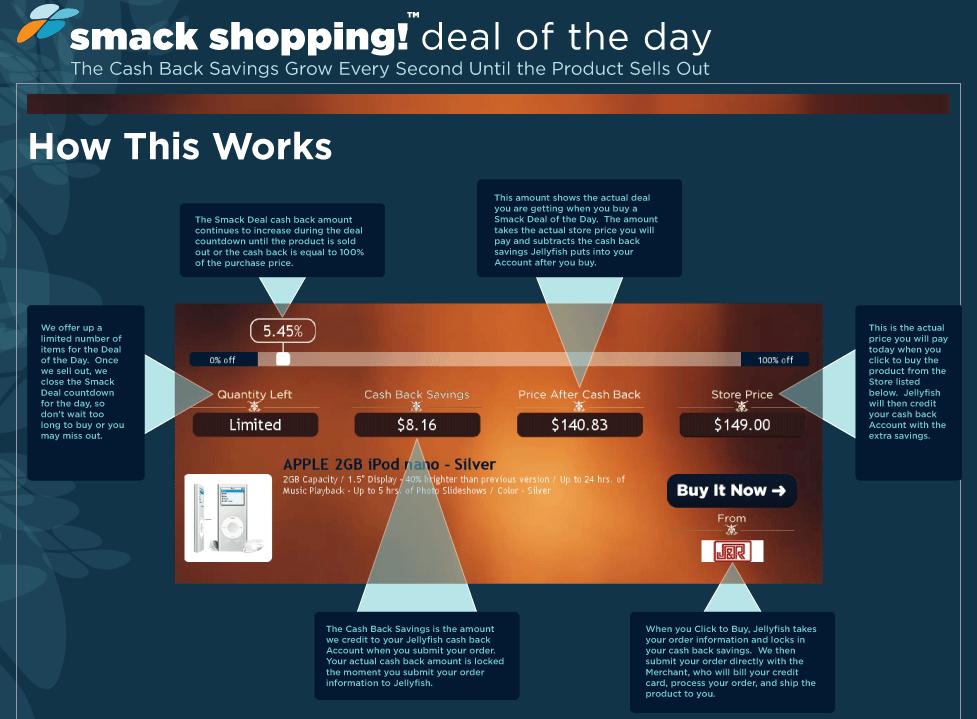
Jellyfish offers a Smack Shopping Deal of the Day where users participate in what is essentially a Dutch auction. The price of an item (i.e. iPod) is lowered until someone offers to buy it. The trick is that there are a limited number of iPods in stock so you can't wait too long to bid.
There are a lot of psychological and game theoretic ideas that float around this version of the Dutch auction. Jellyfish is sort of bringing a social networking aspect to online shopping. I can see this getting very popular since there's an undercurrent of excitement and preemption about anticipating your opponents' (fellow shoppers) actions all the while trying to get the lowest price.
It's also collaborative since ideally players (shoppers) want to get the lowest price so they should cooperate (i.e. not bid) until the price falls to an absurdly low level. But then there is an incentive to cheat (buy before everyone else) by some players, and there's no way to root it out since you don't know who beat you to the deal (and you can't really punish them). Tit-for-tat doesn't work even though the game is iterative.
Fascinating stuff and good deals too.
Jellyfish
Labels: Technology
"Seven Habits" of the Highly Successful Blogger
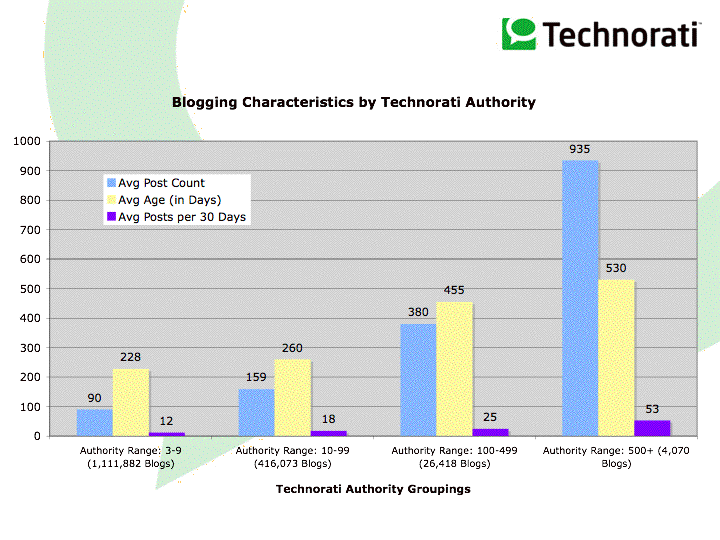 Sifry finds that there is a direct relationship between authority and blog posting volume. In the low, middle, and high authority groups, there isn't much variation in posting frequency or blog age (number of days a blog has been in existence). To get to the high authority group (500 or more blogs linking), it simply takes persistence. It's how long you've been around not how much you post (averaging about 18 posts a month).
However in the very high authority group (more than 4000 blog linking), there is a sea change in behavior. Posting volume doubles, and blog age is about 4 years. (Yes, I lied: there are only two habits: post often and post persistently)
Other findings:
- Technorati is now tracking more than 57 Million blogs.
- Spam-, splog- and sping-fighting efforts at Technorati are paying dividends in terms of the reduction of garbage in our indexes, even if it does seem to impact overall growth rates.
- Today, the blogosphere is doubling in size approximately every 230 days.
- About 100,000 new weblogs were created each day, again down slightly quarter-over-quarter but probably due in part to spam fighting efforts.
- About 4% of new splogs get past Technorati's filters, even if it is only for a few hours or days.
- There is a strong correlation between the aging and post frequency of blogs and their authority and Technorati ranking.
- The globalization of the blogosphere continues. Our data appears to show both English and Spanish languages are a more universal blog language than the other two most dominant language, Japanese and Chinese, which seem to be more regionally localized.
- Coincident with a rise in blog posts about escalating Middle East tensions throughout the summer and fall, Farsi has moved into the top 10 languages of the blogosphere, indicating that blogging continues to play a critical role in debates about the important issues of our times.
Labels: Technology
GSpace Firefox Extension Bought for Undisclosed Sum

Om Malik reports that the popular GSpace Firefox extension created by Rahul Jonna, which allows users to turn their Gmail account into a remote hard drive, was bought by FON, a Madrid-based WiFi services company. My question: is this a first? I haven't heard of other Firefox extensions that have been bought before.
FON, which aims to create a FON WiFi network via its $5 wireless routers, plans to integrate GSpace into their FON Liberator product, which will let users plug in USB-enabled devices like iPods, hard drives, or flash drives and transfer files onto or off of them. The Liberator is basically a wireless router so users can remotely control the file transfer via a web-based interface.
It's an interesting development to see FON buy GSpace instead of simply coding it themselves. Maybe they're trying to appeal to the open source and early adopter community since FON is, for the moment, a product that appeals mostly to those demographics.
Labels: Technology
Download High Quality PDFs for Work, School, and Play

PDF Pad has a nice collection of PDF documents including Sudoku puzzles, flags, graph paper, and calendars. Each page has several options you can play around with like selecting the size of the PDF pages or page orientation. For instance, you can select what type of graph paper you want (Cartesian, polar, isometric, and many others), the size, and measuring units.
Sudoku enthusiasts will like the Sudoku page, which allows you to generate puzzles based on difficulty level and also lets you print out the puzzle solution.
PDF Pad
Related: Solve a Sudoku Puzzle without Thinking
[via]
Labels: Technology
Get Aging Tabs in Firefox

The Firefox power users out there will find Aging Tabs very useful in organizing the dozens of tabs they have open. This extension highlights the active tab and slowly fades unused tabs. You can choose how you want to age tabs (when switching tabs, when the URL changes, or by seconds) along with what colors you want to use.
I wasn't sure how useful this extension was, but after trying it out, I really like it. It helps find tabs that haven't been looked at in a while, which probably won't ever be looked at and are just taking up space. If you only have a few tabs open at a time, this extension won't be too useful, but with dozens, it can really improve your productivity.
Aging Tabs Extension
[via]
Labels: Technology
Search for Torrents with GoogleTorrents

GoogleTorrents uses Google's Custom Search Engine service to create a metasearch engine for Bittorrent files. Big torrent sites like Mininova, The Pirate Bay, TorrentSpy, and Demonoid are included in the search engine.
The trademark violating name notwithstanding, GoogleTorrent is a fast way to search multiple Torrent sites. Of course, if it does get a cease and desist, you can easily create your own torrent search engine. From the looks of it, the missing logo might be an indication that the site owners are looking for a new name.
GoogleTorrents
Labels: Technology
Yahoo Shopping Gets New Look for the Holidays
 Yahoo Shopping has been redesigned with a new Bargains Center, integrated Yahoo Answers, Search Shortcuts, and Buying Guides with professional reviews. Other features include:
- Right off the bat, you'll notice we've redecorated the site. We tried to clean things up a bit and make it easier for consumers to quickly find and compare products.
- Everyone loves a great deal, and we've got them at the new Bargains Center, where we round up sales, coupons, free shipping offers, rebates and more from across the Internet.
- Facts and more: See the category Buying Guides for professional reviews from Consumer Reports and other leading publications (example: Garden & Patio Buying Guide).
- Got questions? We've got answers. Check the integrated Yahoo! Answers sections throughout our site for real-world advice and product recommendations from other online buyers.
- Search our 70 million product offers however you'd like: by merchant, brand, type of product, item popularity, or price.
- Get automatic updates by adding the Popular Products and Deals module to your My Yahoo! page. It's all at your fingertips on our homepage.
- Access Yahoo! Shopping products, reviews, and coupons directly from Yahoo! Search. For example, search results for "mp3 player" from the Yahoo! home page will include links to buying guides, markdowns, and popular mp3 player brands. We call these "Search Shortcuts;" you'll call them convenient.
- Keep track of items you're interested in. The new Yahoo! Shopping home page remembers your recent searches and saved products so you can go back to them later.
- Help for the holidays: Our Holiday Gift Guide features Top 10 lists and recommendations to help you choose just the right presents for family and friends.
Labels: Technology
Search as Shopping
Search can be motivated in three ways (PDF): by information, transaction, or navigation. Information meaning "I want to find out more about polar bears". Transaction meaning "I want to buy the latest Harry Potter book from Amazon at a low price". Lastly, navigation meaning "What's the address for Google?" (don't laugh, this is actually more common than you think). Like shopping, you're motivated by both visceral and whimsical factors in some proportion every time you do a search.
So, what's the best way for you to actually find what you're looking for? Traditionally, a search engine just gives you a list of results with a few key phrases highlighted, and you have to do the hard work of figuring out if a site is what you're looking for. Contrast that with shopping where you head toward the product you're looking for via very generic markers (a placard above every aisle listing what's there).
Let's step back a bit, and start at the beginning of our journey into the supermarket. Notice that your typical supermarket has a bunch of items stacked near the entrance. You can't get in the store without at least glancing a little at what's displayed. If you were ever going to impulse buy something, it's in those first few seconds when you step in the door. There are no other goods competing for your attention. It's like tunnel vision, channeling your line of sight. Like search, the first page of search results is what you look at most closely. Maybe it's the only page you look at. Even if you're the rare, determined searcher who isn't content until you find what you're looking for, the sheer drudgery of skimming through page after page of results wears you down.
Back to the aisle. Once you actually get to the aisle, you don't usually look at every single box of, say, coffee to find the one you're looking for. If it's your favorite brand, all you do is look for the telltale brand and coloring of the package. In other cases, a new item, because of its novelty, catches your eye. You don't recognize it so you look closer. Notice that you don't really pay attention to the boxes you know aren't what you want. It's all handled subconsciously.
Of course, it's the fact that Folgers has done a lot of promotions that you recognize its brand. Not so when you're searching the web where it's unlikely you'll recognize any page you're looking at. But, think, what if a search engine automatically annotated search results with little logos? Say, the results that lead toward a page hosted by Yahoo gets a little Y! logo next to it. Let's go further, what if, for those pages located in the long tail of the web (the ones you would never have known existed if you hadn't used a search engine to look for it), a small screenshot of the site or some other visual cue were placed next the result?
You've probably noticed that it doesn't take as much effort to take in a picture or painting as compared to reading a novel. A picture is worth a thousand words, as the saying goes. The cognitive load is lower to look at a picture than to read a piece of text. It's the classic left brain/right brain divide:
Following the standard line, the left hemisphere is the logical hemisphere, involved in speech, reading, and writing. It is the analytical hemisphere that evaluates factual material in a rational way and that understands the literal interpretation of words. It is a serial processor that tracks time and sequences and that recognizes words, letters, and numbers. The right hemisphere is the intuitive, creative hemisphere. It gathers information more from images than from words. It is a parallel processor well suited for pattern recognition and spatial reasoning. It is the hemisphere that recognizes faces, places, and objects.
Are these search engines actually better? Personally, I don't find right brain search engines to be better than Google, but others with different sensibilities might disagree. If you need to quickly analyze a set of data, the proper visual representation of a large dataset is critical. In that case, a right brain type of search engine would be very helpful. As far as the current crop of right brain search engines, I'm still shopping for better. Much more work needs to be done to truly leverage the power of pictures.
Labels: Technology
Is your Right-Click Menu Loading Too Slowly?
My problem was with an Intel Graphics driver; the right-click context menu loaded very, very slowly after I installed a new monitor. Immediately, I suspected a driver problem, and, as it turns out, for me it was. Since I have an Intel graphics card installed, the right click menu contained items like Graphics Properties and Graphics Options. Somehow, this created a conflict between the Intel driver and the new monitor's driver.
Luckily, Intel has provided a very helpful registry hack (download here) that will remove those two Graphics entries from your context menu. Before using it, though, you might want to backup your registry just in case.
If the Intel hack doesn't work or if you don't have an Intel graphics card, you might want to check out ShellExView, which will let you disable any entries (shell extensions) in your context menu one by one until you find the source of the problem. A good tutorial is located here. Oftentimes, delays occur because too many programs have installed extensions in your context menu.
Labels: Technology