


Saturday, June 23, 2007
How to Fix Dead or Stuck LCD Monitor Pixels

Dead pixels are a common problem associated with liquid crystal display (LCD) monitors. They show up as dots on your screen that either always lit up or dark. Constantly lit pixels are called stuck pixels to distinguish them from dead, or constantly dark, pixels.
If you discover dead pixels shortly after removing your monitor from its packaging, you can easily return it as defective, but pixels can suddenly die as time goes by.
There are a few ways to fix this problem using software. They aren't guaranteed to work, but they might be worth a look before you try to get a refund for your monitor.
Web-Based Fixes
JScreenFix: A Java applet for fixing stuck LCD pixels and reduce screen burn-in on plasma monitors. Runs in your browser.
Software Fixes
Dead Pixel Fixer: Flashes red, green, blue, black, and white in a loop to fix dead pixels. Claims 60% fix rate. Run for several hours or overnight.
UDPixel: Fix stuck pixels by telling them to make rapid changes. Run for a couple hours.
Photo Credit: Marcelo Alves
Labels: Technology


Thursday, June 21, 2007
Create Internet Shortcuts for Nintendo Wii
WiiScrap is like TinyURL for the Nintendo Wii. You can create a shortcut to a folder of bookmarked websites that you can easily access through the Wii's Internet Channel.
You can add multiple websites to the same shortcut, which is a major timesaver. Just enter some URLs into WiiScrap, create a shortcut to access them, and hit Go. You have to enter URLs one by one, however. Just choose the same shortcut each time.
To access your bookmarks folder from the Wii, select the Internet Channel and navigate to WiiScrap. Enter your shortcut into the box with the word "scraps" in it, and it will bring up your folder.
RSS feeds are also supported.
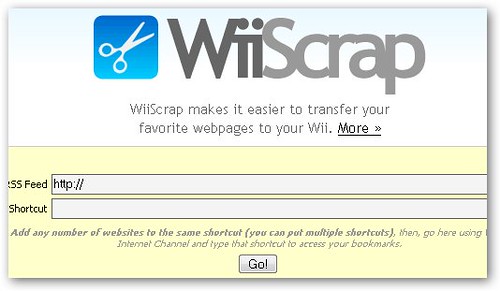
You can add multiple websites to the same shortcut, which is a major timesaver. Just enter some URLs into WiiScrap, create a shortcut to access them, and hit Go. You have to enter URLs one by one, however. Just choose the same shortcut each time.
To access your bookmarks folder from the Wii, select the Internet Channel and navigate to WiiScrap. Enter your shortcut into the box with the word "scraps" in it, and it will bring up your folder.
RSS feeds are also supported.
Labels: Technology
Turn Email into a Videogame with 3D Mailbox
3D Mailbox turns email into a videogame.
Those burdened with a daily influx of hundreds of emails will probably find it hard to believe that email could be fun, but 3D Mailbox tries hard to make it so.
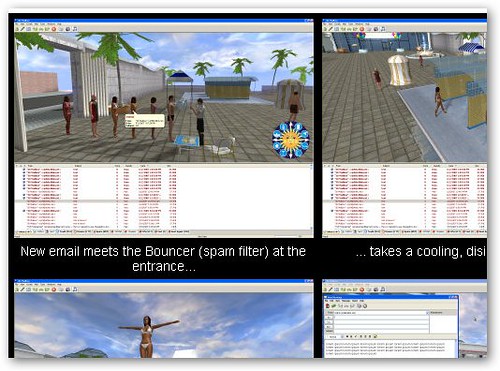
In the Miami Beach themed version, emails are represented by swimsuit-clad people who must pass a bouncer to get into your inbox. After that, they swim around until you read them. There are lots of other amusing tweaks; for instance, junk emails are eaten by sharks.
The top half of your screen shows the Miami Beach themed visualization of your email while the bottom half is just your traditional inbox. It's an email client like Thunderbird and Outlook so you can read and reply to emails in addition to looking at pretty pictures.
3D Mailbox is compatible with all web-based email services like Gmail so if you're bored with Gmail's spartan interface, you can bring some color into the daily email grind.
The free version leaves a watermark on all outgoing emails, but is otherwise fully featured.
Those burdened with a daily influx of hundreds of emails will probably find it hard to believe that email could be fun, but 3D Mailbox tries hard to make it so.
In the Miami Beach themed version, emails are represented by swimsuit-clad people who must pass a bouncer to get into your inbox. After that, they swim around until you read them. There are lots of other amusing tweaks; for instance, junk emails are eaten by sharks.
The top half of your screen shows the Miami Beach themed visualization of your email while the bottom half is just your traditional inbox. It's an email client like Thunderbird and Outlook so you can read and reply to emails in addition to looking at pretty pictures.
3D Mailbox is compatible with all web-based email services like Gmail so if you're bored with Gmail's spartan interface, you can bring some color into the daily email grind.
The free version leaves a watermark on all outgoing emails, but is otherwise fully featured.
Labels: Technology
Find Definitions and Associations with Visuword Graphical Dictionary
Visuword is a graphical dictionary that not only gives you definitions, but also shows you how one word is related to another.
The visualization of these associations resembles a neural net with nodes representing words and concepts and the lines connecting them showing how they relate to one another. Different colors mean different things. For instance, a node colored green means it's a verb whereas a light green line means one word causes another.
I'm not too sure how useful Visuword is for most people, but if you're looking for the perfect word, it might be a good alternative to a thesaurus for generating ideas.
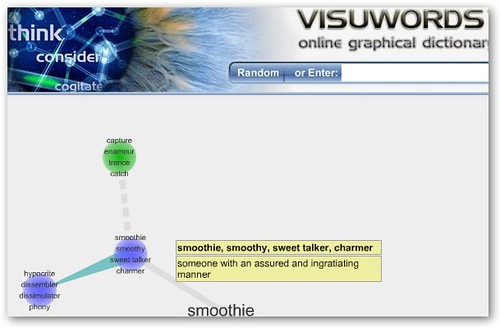
The visualization of these associations resembles a neural net with nodes representing words and concepts and the lines connecting them showing how they relate to one another. Different colors mean different things. For instance, a node colored green means it's a verb whereas a light green line means one word causes another.
I'm not too sure how useful Visuword is for most people, but if you're looking for the perfect word, it might be a good alternative to a thesaurus for generating ideas.
Labels: Technology
Wednesday, June 20, 2007
Missing a Codec? Get Help Playing Videos with CodecInstaller
 Oftentimes, you'll download a file only to discover that you can't play it since you don't have the right codec installed. Codecs decode the information in a video so that you can view it on your monitor.
CodecInstaller is a simple program that tells you what codecs to install to play a video file.
It analyzes a video to figure out what codecs you are missing and tells you where to go to install them.
Download CodecInstaller (Requires Microsoft. NET Framework 2.0)
Labels: Technology
Tuesday, June 19, 2007
O.J. Simpson's If I Did It Leaked Online
A PDF file purported to be O.J. Simpson's book, If I Did It, has appeared online. Originally scheduled for release in 2006, the book was canceled after intense public criticism. All 400,000 copies were reportedly destroyed, but a few have since turned up for auction on eBay.
It starts out with this author's note: "If I did it, this is what happened."
The only thing that could top this would be an early release of Harry Potter and the Deathly Hallows online.
Download If I Did It (may not be suitable for all readers)
[via]
It starts out with this author's note: "If I did it, this is what happened."
The only thing that could top this would be an early release of Harry Potter and the Deathly Hallows online.
Download If I Did It (may not be suitable for all readers)
[via]
Labels: Technology
Fix Your Photos Online with FixPicture
FixPicture is an online image editor that lets you quickly resize and convert photos.
After you upload a photo, basic tools let you resize, rotate, and crop the photo. Simple effects like blur, focus, sepia, and grayscale let do further customization. When you're done, you can save the image to disk.
Using the slick Flash-based editor, you can easily preview how applying different effects to your photo will affect how it looks. Tiny thumbnails are generated automatically that let you preview what the photo looks like after you apply an effect. This is one of the coolest features I've seen in an online editor.
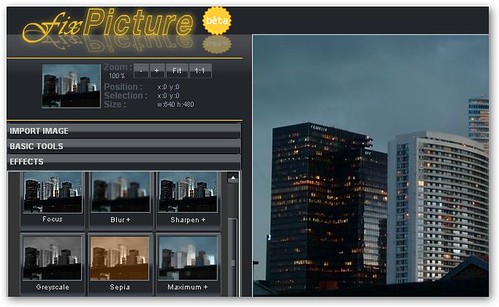
After you upload a photo, basic tools let you resize, rotate, and crop the photo. Simple effects like blur, focus, sepia, and grayscale let do further customization. When you're done, you can save the image to disk.
Using the slick Flash-based editor, you can easily preview how applying different effects to your photo will affect how it looks. Tiny thumbnails are generated automatically that let you preview what the photo looks like after you apply an effect. This is one of the coolest features I've seen in an online editor.
Labels: Technology
Get More Links to Your Blog or Website with WhoLinked
WhoLinked is a simple widget that shows the top sites that are linking to your blog or website.
There are at least two reasons to use this widget:
First, it's a credibility builder. Readers and visitors will be able to instantly see that other sites have found your content interesting enough to link to. If you're sneaky, you can enter someone else's site into WhoLinked and display their links as your own. Like so:
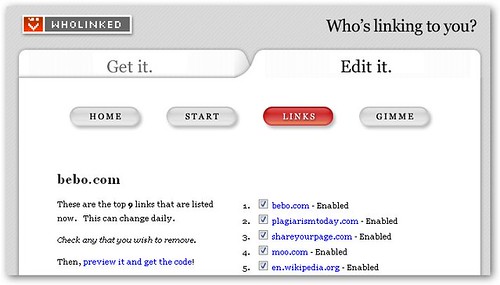
You can edit the links however you like if you register.
Second, it gives visitors to your site more incentive to link to you since they get a chance to be featured in your WhoLinked box.
To get the widget, just enter your URL and then paste a few lines of JavaScript code into your template to display WhoLinked to your site. It's not as brain-dead simple to set up as whos.amung.us, but it's close to it.
There are at least two reasons to use this widget:
First, it's a credibility builder. Readers and visitors will be able to instantly see that other sites have found your content interesting enough to link to. If you're sneaky, you can enter someone else's site into WhoLinked and display their links as your own. Like so:
You can edit the links however you like if you register.
Second, it gives visitors to your site more incentive to link to you since they get a chance to be featured in your WhoLinked box.
To get the widget, just enter your URL and then paste a few lines of JavaScript code into your template to display WhoLinked to your site. It's not as brain-dead simple to set up as whos.amung.us, but it's close to it.
Labels: Technology
Monday, June 18, 2007
Search and Preview Documents Quickly Online (PDF, DOC, PPT)
DocuFarm is both the name of a search engine and browser extension that makes viewing documents online easy and quick.
First off, using the search engine, you can look for PDF, PPT, DOC, RTF, and PS files on the web. Only documents are searched by DocuFarm, not web pages.
An icon next to each search result tells you what type of document you are dealing with. The trick comes when you click on a search result; for example, instead of loading Acrobat for PDF files, DocuFarm processes the file for you and displays each page of the file as a thumbnail.
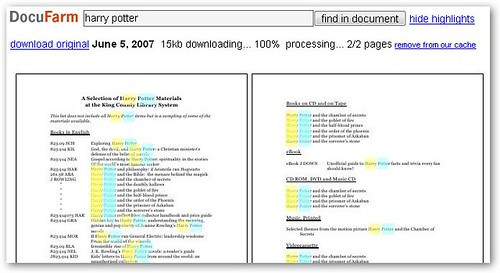
Not only is this a faster way of opening documents, but you can also quickly skim through the document. Of course, you will run into problems when dealing with longer documents.
The browser extension, which is compatible with Firefox and IE, lets you use DocuFarm anywhere on the web. After you install it, just right-click a document link and select "View on DocuFarm..." to preview the document.
First off, using the search engine, you can look for PDF, PPT, DOC, RTF, and PS files on the web. Only documents are searched by DocuFarm, not web pages.
An icon next to each search result tells you what type of document you are dealing with. The trick comes when you click on a search result; for example, instead of loading Acrobat for PDF files, DocuFarm processes the file for you and displays each page of the file as a thumbnail.
Not only is this a faster way of opening documents, but you can also quickly skim through the document. Of course, you will run into problems when dealing with longer documents.
The browser extension, which is compatible with Firefox and IE, lets you use DocuFarm anywhere on the web. After you install it, just right-click a document link and select "View on DocuFarm..." to preview the document.
Labels: Technology
Fun with Graphita: Caption and Doodle on your Photos
Graphita Live Studio lets you add fun captions, doodles, and other objects to your photos.
The simple image editor doesn't try to replace your regular desktop application; instead, Graphita complements it with features that aren't usually found in image editors. Most programs help you make a photo look better, not worse.
After you upload your photo, the simple Flash-based editor lets you drag-and-drop cartoon objects onto your photo with ease. Captions, doodles, and other colorful objects are at your disposal to mix-and-match.
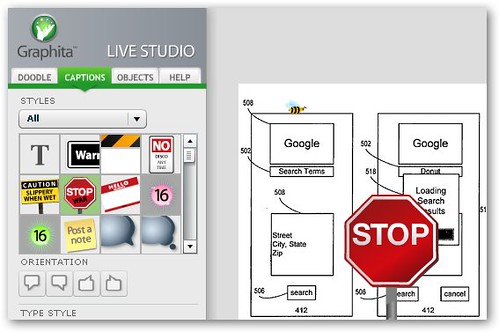
When you're done, you can either download your photo, share it with your friends on Flickr or other image hosting services, or make a mug, shirt, or other novelty item out of it.
The free account lets you store up to 50 images so you have plenty of room to experiment.
The simple image editor doesn't try to replace your regular desktop application; instead, Graphita complements it with features that aren't usually found in image editors. Most programs help you make a photo look better, not worse.
After you upload your photo, the simple Flash-based editor lets you drag-and-drop cartoon objects onto your photo with ease. Captions, doodles, and other colorful objects are at your disposal to mix-and-match.
When you're done, you can either download your photo, share it with your friends on Flickr or other image hosting services, or make a mug, shirt, or other novelty item out of it.
The free account lets you store up to 50 images so you have plenty of room to experiment.
Labels: Technology
Take a Virtual Tour of Europe with Arounder
During the 17th and 18th centuries, young English elites used to travel for two to four years around Europe in order to broaden their horizons. This was called the Grand Tour.
Nowadays, you can do much the same from the comfort of your cubicle or study.
Arounder lets you take virtual tours of 30 European cities including Rome, Paris, Berlin, and Amsterdam. Each city has its own section on the site with the locations of landmarks and other notable sights marked by green and red pins on Google Maps. Major landmarks can be toured using 360 degree panoramas that you can rotate and zoom in and out of.
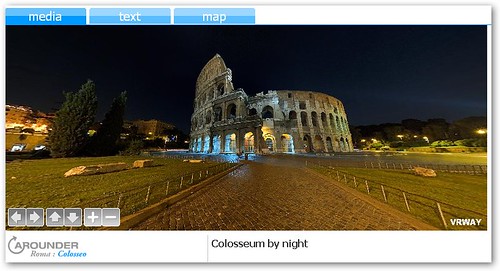
You can also easily go virtual sightseeing and plan your vacation itinerary with ease. If something looks good on screen, it might be worth a look in person.
So far, only four cities outside Europe (all in the US) are being covered by Arounder, but content seems to be updated frequently. Overall, Arounder makes for a nice complement to guide books and other travel materials that are less visually stimulating.
Nowadays, you can do much the same from the comfort of your cubicle or study.
Arounder lets you take virtual tours of 30 European cities including Rome, Paris, Berlin, and Amsterdam. Each city has its own section on the site with the locations of landmarks and other notable sights marked by green and red pins on Google Maps. Major landmarks can be toured using 360 degree panoramas that you can rotate and zoom in and out of.
You can also easily go virtual sightseeing and plan your vacation itinerary with ease. If something looks good on screen, it might be worth a look in person.
So far, only four cities outside Europe (all in the US) are being covered by Arounder, but content seems to be updated frequently. Overall, Arounder makes for a nice complement to guide books and other travel materials that are less visually stimulating.
Labels: Technology
Turn Off Google Personalized Search (Firefox, IE Extension)
Does Google know you too well?
If you have Web History turned on in your Google account, it might.
Google learns from your past searches and what you click on to custom-tailor future search results. This might not be a problem most of the time, but if you're trying to see how well different sites rank, then you'll be getting biased results.
It might also be the case that personalized Google results are actually worse than regular results.
To get "clean" Google search results, you can append "&pws=0" to the end of the Google search URL or install a Google Search plugin that does it automatically for you. Luckily, this plugin works on both IE7 and Firefox.
If you have Web History turned on in your Google account, it might.
Google learns from your past searches and what you click on to custom-tailor future search results. This might not be a problem most of the time, but if you're trying to see how well different sites rank, then you'll be getting biased results.
It might also be the case that personalized Google results are actually worse than regular results.
To get "clean" Google search results, you can append "&pws=0" to the end of the Google search URL or install a Google Search plugin that does it automatically for you. Luckily, this plugin works on both IE7 and Firefox.
Labels: Technology


