


Friday, June 15, 2007
Odiogo: Transform your Blog into a Podcast
Odiogo converts your blog posts into podcasts, automatically.
It takes your RSS feed and runs it through text-to-speech software to transform your blog into a podcast. After you sign up, it may take a day or two for them to process your content into MP3 audio files.
Naturally, the first thing I was afraid of was an awkward and artificial-sounding mechanical voice reading out my blog posts. Odiogo isn't too bad in that respect, but you can clearly tell that they've used text-to-speech software to create the podcast. It doesn't sound like a real person speaking.
Still, it can open up your blog to a whole new demographic: "readers" who prefer to listen to your blog and the visually-impaired.
You can check out the quality of the podcasts by hearing how Digital Alchemy sounds as a podcast here.
'
However, there's one more concern. Audio ad spots are inserted into your podcast by Odiogo which may be a concern for some of you. This is the path to monetizing free content and services that We7 also follows to provide free music downloads.
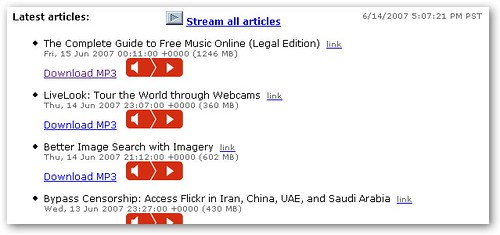
It takes your RSS feed and runs it through text-to-speech software to transform your blog into a podcast. After you sign up, it may take a day or two for them to process your content into MP3 audio files.
Naturally, the first thing I was afraid of was an awkward and artificial-sounding mechanical voice reading out my blog posts. Odiogo isn't too bad in that respect, but you can clearly tell that they've used text-to-speech software to create the podcast. It doesn't sound like a real person speaking.
Still, it can open up your blog to a whole new demographic: "readers" who prefer to listen to your blog and the visually-impaired.
You can check out the quality of the podcasts by hearing how Digital Alchemy sounds as a podcast here.
'
However, there's one more concern. Audio ad spots are inserted into your podcast by Odiogo which may be a concern for some of you. This is the path to monetizing free content and services that We7 also follows to provide free music downloads.
Labels: Technology


Clear YouTube Viewing History Automatically
You might not have noticed this, but YouTube keeps a record of every video you have viewed if you are logged in. You can find your viewing history by clicking on the link marked "History" in the upper right corner which has a little red dot next to it.
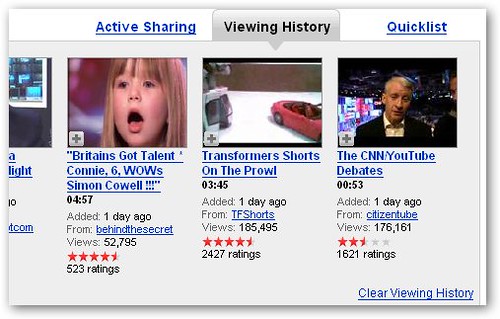
It's easy to clear your viewing history just by clicking a link, but it can be tiresome to have to do it manually every time. There isn't an option to disable it either.
This is where YouTube History Bleach comes in. It's a Firefox extension that automatically clears your viewing history every time you watch a video so it looks like this every time:
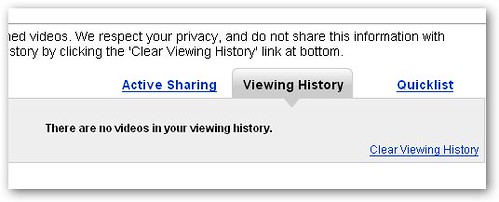
It's easy to clear your viewing history just by clicking a link, but it can be tiresome to have to do it manually every time. There isn't an option to disable it either.
This is where YouTube History Bleach comes in. It's a Firefox extension that automatically clears your viewing history every time you watch a video so it looks like this every time:
Labels: Technology
Thursday, June 14, 2007
The Complete Guide to Free Music Online (Legal Edition)
Free online music used to be like the Wild West of the Internet with services like Napster dominating the field during the bubble. Now, as the Internet has matured, new models for distributing music are coming together.
But who's going to pay for all this free, legal music? A common answer to this pesky question is advertising, but some justify it as a marketing cost and some are still silent on how exactly they'll make this "new" business model work.
But the important part is that you can take advantage of their generosity right now by downloading or listening to as much music as you can handle.
The Complete(?) Guide to Free Online Music
1. We7: Free downloads with a 10 second advertisement inserted at the beginning of every track. Restrictions: None. Review.
2. Lala: Listen to unlimited free music on-demand. Restrictions: None. Review. Dead for now.
3. SpiralFrog: Free, ad-supported music downloads. Restrictions: DRM, US and Canada-only.
4. Ruckus: Free unlimited music downloads. 2.5 million tracks in library. Restrictions: DRM, college students only.
5. Slacker: Play music on-demand along with music recommendations. Restrictions: US only. Review.
6. Pandora: Streaming music recommendation service. Restrictions: US only, not on-demand.
7. Last.fm: Streaming music recommendation service. Restrictions: Not on-demand.
8. eMusic: Limited to 25 MP3 downloads during free trial period. 2 million song library. Restrictions: Limited downloads.
9. Qtrax: Unlimited downloads and song plays with contextual ads. P2P-based client released, but limited download selection. Restrictions: DRM(?).
10. Playble: A free music download service from The Pirate Bay. Forthcoming. Restrictions: None. Review.
11. Broadclip: Like TiVo for Internet radio stations. Schedule recordings of your favorite music and download them later as MP3s. Free software download required. Restrictions: None.
12. iLike: Discover new music through your friends. Share your music library. Download free MP3s of new artists. Restrictions: None.
13. MyStrands: Downloadable application to tag, share, manage, and discover new music. Restrictions: None.
14. iJigg: Digg for music. Rate, stream, and download free music. Restrictions: None.
15. SoundPedia: Listen to free streaming music. Create and share playlists. Restrictions: None.
16. Haystack: Social network for sharing and discovering new music. Restrictions: None.
17. Deezer: Free streaming online music. On-demand. Formerly called BlogMusik. Restrictions: None. Review.
New!
18. Seeqpod: MP3 search engine that lets you play music that you find in your browser. Restrictions: None. Review.
19. Jango: Free site that lets you play streaming music on-demand along with related artists. Sticks to more popular music selections than Pandora. Restrictions: None. Review.
20. Jamendo: Features free downloadable music from independent artists released under the Creative Commons. Feel free to tip the artists if you like their music. Restrictions: None. Review.
21. The Hype Machine: Listen to music gathered from blogs around the world. Restrictions: None. Review.
22. Did we miss your site? Send us an email with the details or mention it in the comments below.
But who's going to pay for all this free, legal music? A common answer to this pesky question is advertising, but some justify it as a marketing cost and some are still silent on how exactly they'll make this "new" business model work.
But the important part is that you can take advantage of their generosity right now by downloading or listening to as much music as you can handle.
The Complete(?) Guide to Free Online Music
1. We7: Free downloads with a 10 second advertisement inserted at the beginning of every track. Restrictions: None. Review.
3. SpiralFrog: Free, ad-supported music downloads. Restrictions: DRM, US and Canada-only.
4. Ruckus: Free unlimited music downloads. 2.5 million tracks in library. Restrictions: DRM, college students only.
5. Slacker: Play music on-demand along with music recommendations. Restrictions: US only. Review.
6. Pandora: Streaming music recommendation service. Restrictions: US only, not on-demand.
7. Last.fm: Streaming music recommendation service. Restrictions: Not on-demand.
8. eMusic: Limited to 25 MP3 downloads during free trial period. 2 million song library. Restrictions: Limited downloads.
9. Qtrax: Unlimited downloads and song plays with contextual ads. P2P-based client released, but limited download selection. Restrictions: DRM(?).
10. Playble: A free music download service from The Pirate Bay. Forthcoming. Restrictions: None. Review.
11. Broadclip: Like TiVo for Internet radio stations. Schedule recordings of your favorite music and download them later as MP3s. Free software download required. Restrictions: None.
12. iLike: Discover new music through your friends. Share your music library. Download free MP3s of new artists. Restrictions: None.
13. MyStrands: Downloadable application to tag, share, manage, and discover new music. Restrictions: None.
14. iJigg: Digg for music. Rate, stream, and download free music. Restrictions: None.
15. SoundPedia: Listen to free streaming music. Create and share playlists. Restrictions: None.
16. Haystack: Social network for sharing and discovering new music. Restrictions: None.
17. Deezer: Free streaming online music. On-demand. Formerly called BlogMusik. Restrictions: None. Review.
New!
18. Seeqpod: MP3 search engine that lets you play music that you find in your browser. Restrictions: None. Review.
19. Jango: Free site that lets you play streaming music on-demand along with related artists. Sticks to more popular music selections than Pandora. Restrictions: None. Review.
20. Jamendo: Features free downloadable music from independent artists released under the Creative Commons. Feel free to tip the artists if you like their music. Restrictions: None. Review.
21. The Hype Machine: Listen to music gathered from blogs around the world. Restrictions: None. Review.
22. Did we miss your site? Send us an email with the details or mention it in the comments below.
Labels: Technology
LiveLook: Tour the World through Webcams
LiveLook is a Google Maps mashup that lets you browse webcams around the world by location.
Webcams are represented by red placemarks that you'll see scattered all over the map. Clicking the placemark will bring up a thumbnail image of what the webcam is broadcasting along with its latitude and longitude.
Since each webcam has a precise location on Google Maps, you can get very specific webcam images of a particular location. These are all outdoor-view webcams so it's more for sightseeing purposes than voyeurism.
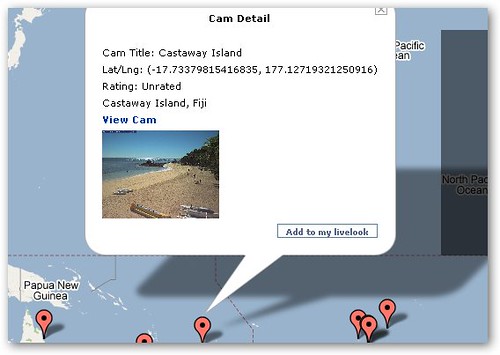
Webcams are represented by red placemarks that you'll see scattered all over the map. Clicking the placemark will bring up a thumbnail image of what the webcam is broadcasting along with its latitude and longitude.
Since each webcam has a precise location on Google Maps, you can get very specific webcam images of a particular location. These are all outdoor-view webcams so it's more for sightseeing purposes than voyeurism.
Labels: Technology
Better Image Search with Imagery
Imagery is an attempt to make image search better.
Imagery processes search results from Google Images to make finding images faster and more intuitive. The chief way it does this is by reducing the amount of text on the page in favor of visual representations of data.
In the place of image dimensions, Imagery shows you how large an image is relative to the size of your screen. A green box means the image is smaller than your screen, and a red box means it's bigger.
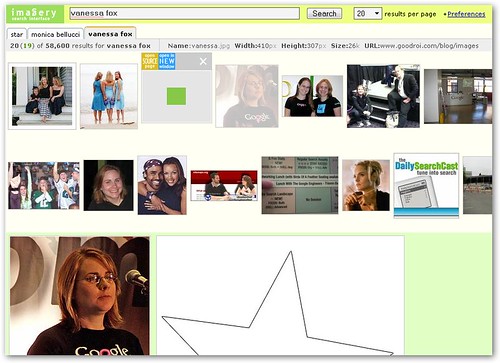
You can either mouse-over an image to see the comparison for that particular image or click on the white space between the images to see the relative sizes for all the images.
To see the original image, click on its thumbnail to open it instantly on the same page. There's also a handy tabbed browsing interface to keep track of your past searches. A complete list of clever shortcuts and well thought out touches can be found here.
Overall, Imagery manages the feat of transforming Google Image search from a somewhat clunky and awkward tool to a slick and fluid visual way of conducting image searches.
Imagery processes search results from Google Images to make finding images faster and more intuitive. The chief way it does this is by reducing the amount of text on the page in favor of visual representations of data.
In the place of image dimensions, Imagery shows you how large an image is relative to the size of your screen. A green box means the image is smaller than your screen, and a red box means it's bigger.
You can either mouse-over an image to see the comparison for that particular image or click on the white space between the images to see the relative sizes for all the images.
To see the original image, click on its thumbnail to open it instantly on the same page. There's also a handy tabbed browsing interface to keep track of your past searches. A complete list of clever shortcuts and well thought out touches can be found here.
Overall, Imagery manages the feat of transforming Google Image search from a somewhat clunky and awkward tool to a slick and fluid visual way of conducting image searches.
Labels: Technology
Wednesday, June 13, 2007
Bypass Censorship: Access Flickr in Iran, China, UAE, and Saudi Arabia
 Not everyone loves Flickr. The photo sharing site has recently been banned in China (reported earlier). This move follows similar censorship by the governments of Iran, UAE, and Saudi Arabia.
However, it turns out that they aren't being too sophisticated about the ban on Flickr. If you have Firefox, you can install an extension called Access Flickr that lets you bypass the filter.
To be technical, the extension substitutes some parameters in the HTTP header that the government firewalls haven't been programmed to recognize and block. There isn't any need for proxies or more exotic measures like VPNs.
Labels: Technology
Mahalo Pays you for Search Results ($15 each)

The much-hyped Mahalo search engine is looking for part-time Guides to write search results for $10 to $15 per result.
Mahalo relies on people, not algorithms, to generate its search results. Since they are looking to produce professional-quality content, Mahalo is never going to grow as fast as a site like Wikipedia, which lets anyone contribute. In some ways, Wikipedia's success is proof enough that Mahalo is irrelevant in the age of user-generated content.
Would you rather read about Apple's iPhone on Wikipedia or Mahalo?
For another thing, it simply isn't cost effective to write about long-tail search terms, which is where the real power of human-powered search comes in. Not enough people will visit the page to make up for the cost of creating it. And for popular search terms, Wikipedia is likely to already have a much-scrutinized and frequently updated page.
But they have $16 million to burn from the likes of News Corp and Sequoia Capital to prove me and many other people wrong. That's about a million search results at $15 each.
Right now, only US citizens are eligible to become guides, but if they really want to grow, they will need to open it up worldwide. In countries where people earn less than a dollar a day, $15 a result is real money and real incentive.
If you're still interested, read the FAQ and apply here. A most wanted list is also available if you want to take a gander at what you'll be writing about if accepted.
Labels: Technology
MassMirror: Upload to Multiple File Hosts with One-Click (Rapidshare, Megaupload, etc.)
MassMirror lets you upload a file to multiple free file hosting services with one-click.
Why is this useful? Many file hosts have daily download limits and other restrictions so if you want your file to be easily accessible it makes sense to distribute it far and wide. Also, if you're expected heavy traffic like a Slashdotting or Digg effect, mirroring files to multiple sites is a smart way to save on bandwidth costs.

The file hosts that MassMirror currently works with are Rapidshare, Megaupload, Depositfiles, Sendspace, Zshare, Badongo, and 4filehosting. Support for my favorite host, Mediafire, is upcoming.
You can either upload a file from your computer or specify the URL of a file that you want mirrored. After MassMirror gets a copy of your file, it re-uploads it to the 7 file hosts that it currently supports. This is extremely fast.

To share your file, just use the URL that MassMirror gives you after upload is complete. This will load a list of mirrors that downloaders can choose to download from.
Why is this useful? Many file hosts have daily download limits and other restrictions so if you want your file to be easily accessible it makes sense to distribute it far and wide. Also, if you're expected heavy traffic like a Slashdotting or Digg effect, mirroring files to multiple sites is a smart way to save on bandwidth costs.
The file hosts that MassMirror currently works with are Rapidshare, Megaupload, Depositfiles, Sendspace, Zshare, Badongo, and 4filehosting. Support for my favorite host, Mediafire, is upcoming.
You can either upload a file from your computer or specify the URL of a file that you want mirrored. After MassMirror gets a copy of your file, it re-uploads it to the 7 file hosts that it currently supports. This is extremely fast.
To share your file, just use the URL that MassMirror gives you after upload is complete. This will load a list of mirrors that downloaders can choose to download from.
Labels: Technology
Share, Rate, and Discover Beautiful Desktop Wallpapers
Social Wallpapering is a site for users to browse, classify, and download stunning wallpapers to use as background images for their desktop.
It's extremely easy to upload and share your favorite wallpaper; be sure to select a category and compose a title for it along with an optional description and tags.

Wallpapers on the site are broken down into dozens of categories and sub-categories like Space, Abstract, Fantasy, and TV and Movies. You can also view the most popular, highest rated, and most recent wallpapers.
Mousing over a wallpaper thumbnail brings up its size and dimensions along with some descriptive text so you can easily find a wallpaper that fits your desktop. You can also rate each wallpaper using Reddit-like up-and-down voting buttons located below each thumbnail.
The wallpapers have been assembled into four BitTorrent packs for easy downloading.
Social Wallpapering also represents a unique take on applying the wisdom of crowds to filtering information. The creator of the site specifically cites Kevin Rose and Digg as the inspiration for the site, but he takes it further than most Digg clones. Most other sites that try to apply the same principle to different verticals end up copying Digg too closely by taking an off-the-shelf CMS like Pligg and failing to customize it enough. Social Wallpapering doesn't fall into this trap.
It's extremely easy to upload and share your favorite wallpaper; be sure to select a category and compose a title for it along with an optional description and tags.
Wallpapers on the site are broken down into dozens of categories and sub-categories like Space, Abstract, Fantasy, and TV and Movies. You can also view the most popular, highest rated, and most recent wallpapers.
Mousing over a wallpaper thumbnail brings up its size and dimensions along with some descriptive text so you can easily find a wallpaper that fits your desktop. You can also rate each wallpaper using Reddit-like up-and-down voting buttons located below each thumbnail.
The wallpapers have been assembled into four BitTorrent packs for easy downloading.
Social Wallpapering also represents a unique take on applying the wisdom of crowds to filtering information. The creator of the site specifically cites Kevin Rose and Digg as the inspiration for the site, but he takes it further than most Digg clones. Most other sites that try to apply the same principle to different verticals end up copying Digg too closely by taking an off-the-shelf CMS like Pligg and failing to customize it enough. Social Wallpapering doesn't fall into this trap.
Labels: Technology
Show Off Your Workspace on Deskshot

I'm always on the lookout for better ways to organize my desk so I was thrilled to find Deskshot, a site devoted to showing off your desk workspace.
Like sharing screenshots of your computer's desktop, sharing pictures of how you arrange things on your desk is part voyeuristic and part food for thought. It can give you ideas on how to increase productivity and reduce repetitive stress injuries by arranging accessories like keyboards and mice and other commonly used items in a way that minimizes stress and strain.
It's also just interesting to see what other people have on their desks.
Deskshot is just starting out so there haven't been too many "deskshots" posted yet, but you can browse the ones that have been by date posted and popularity.
I'm a little hesitant to post a review of Deskshot since they seem to have paid several bloggers to write about them, but this is not a sponsored review. Interested readers can copy and paste the link below to reach Deskshot.
Deskshot: http://www.deskshot.com
Labels: Technology
Tuesday, June 12, 2007
Google Sends 24% of All Wikipedia Traffic
 Even casual Google users will have often seen Wikipedia articles pop up surprisingly near the top of the search results page, and for many search terms, they are seen by Google as the most authoritative pages of all.
Until now, however, it wasn't clear just how much traffic Wikipedia gets as a result of Google's patronage. According to Wikimedia's server logs, about 1.7 billion page views are generated as a result of Google traffic. This is about 24% of the total monthly traffic on all of the wikis hosted by Wikimedia. Wikipedia makes up the majoriy of the Wikimedia project.
By contrast, Yahoo sends 2% of total traffic, and MSN and Live Search combined send less than 1%. For whatever reason, Google's algorithms rank Wikipedia pages as being significantly more relevant than any other search engine.
This just goes to show how Google can make or break your website or blog, and the importance of search engine optimization.
[via]
Labels: Technology
Download Music from IMEEM, Pandora, Last.fm, and MySpace with Grab++
The makers of the impressive Orbit Downloader have released a beta version of Grab++, which extends Orbit's capabilities so you can download music from services like Pandora, IMEEM, Last.fm, MySpace, and Yahoo Music.
However, Grab++ isn't quite ready for primetime. Right now, every time I start it my browser crashes. Something about the browser monitoring that lets Grab++ capture music URLs causes Firefox and IE7 to suddenly quit.
If you still want to give it a try (maybe you'll have better luck), be sure to run Grab++ first before visiting Pandora or whatever social music site you frequent. Then start playing a song, and you should see that the download URL has been captured in Grab++.
You'll need to have Orbit Downloader installed also.

However, Grab++ isn't quite ready for primetime. Right now, every time I start it my browser crashes. Something about the browser monitoring that lets Grab++ capture music URLs causes Firefox and IE7 to suddenly quit.
If you still want to give it a try (maybe you'll have better luck), be sure to run Grab++ first before visiting Pandora or whatever social music site you frequent. Then start playing a song, and you should see that the download URL has been captured in Grab++.
You'll need to have Orbit Downloader installed also.
Labels: Technology
A Search Engine for Music Lyrics and Videos
ChizMax is a specialized search engine for music lyrics and videos.
To find the lyrics for a track, enter a song name, artist, or a combination of the two to bring up a listing of tracks that are covered by the ChizMax search engine.
Each track has its own separate page with its full lyrics and a music video from YouTube if it's available. Thumbnail images from the video also add a splash of color to the otherwise spartan interface.
Of course, now that Yahoo has launched an officially licensed music lyrics service, user-transcribed lyrics sites are in danger of becoming irrelevant, but ChizMax has nicely integrated text and video into a lightweight page that music lovers who don't mind the occasional typo may prefer.

To find the lyrics for a track, enter a song name, artist, or a combination of the two to bring up a listing of tracks that are covered by the ChizMax search engine.
Each track has its own separate page with its full lyrics and a music video from YouTube if it's available. Thumbnail images from the video also add a splash of color to the otherwise spartan interface.
Of course, now that Yahoo has launched an officially licensed music lyrics service, user-transcribed lyrics sites are in danger of becoming irrelevant, but ChizMax has nicely integrated text and video into a lightweight page that music lovers who don't mind the occasional typo may prefer.
Labels: Technology
Web-Based PVR: Record TV and Radio Over the Internet

Faucet is a web-based PVR that lets you schedule recordings of TV and radio programs. It's like controlling TiVo over the Internet except it's free.
Simply select a channel to record, choose a date, and set a start and end time to schedule a recording. Faucet does the rest. TV shows are recorded as MP4 files, and radio programs can be downloaded as MP3s.
Since the site is based in Italy, most of the content are Italian terrestrial TV channels like Rai, SportItalia, and CameraDeputati. There is some English programming in the form of BBCWorld and MTV. Still, what Faucet lacks in content, it makes up for in novelty value.
However, I wasn't actually brave enough to view the recordings that were made by Faucet after I saw this warning message pop up:

Faucet asks to read private data from any site or window open in your browser, which for me is a dealbreaker.
A braver user than I will have to try out the service to see if it actually works.
Labels: Technology
Monday, June 11, 2007
Free Access to Subscription-Only Web Content (Britannica, WSJ, TheStreet.com, etc.)

Congoo is a news portal that lets you access restricted, subscription-only content through a custom toolbar called NetPass.
The majority of information on the web is locked behind subscription or password-protected walls that you can't access using Google or any other search engine. This is often referred to as the invisible web. NetPass is one way to access part of this untapped resource.
Some of the more prominent subscription content sources that can be accessed through NetPass include Encyclopedia Britannica, Morningstar, Zacks, Wall Street Journal, and TheStreet.com. The balance is mainly populated with regional newspapers such as Anchorage Daily News and The Times of India.
Like most toolbars, Congoo's NetPass makes money when you conduct a search via the toolbar and click on an ad on the search results page. They're partnering with Yahoo for search.
Although I am usually reticent to install toolbars, Congoo does work. However, you may only be able to access 4 to 15 articles a month per content publisher. If you are a financial news hound, you will likely be happy installing NetPass. If you're not, it probably isn't worth the trouble since the non-financial content sources aren't too stellar.
Labels: Technology
Download Apple's Safari 3 Browser for Windows

Steve Jobs announced today at WWDC 2007 that Apple will be releasing the Safari 3 web browser for Windows XP and Vista.
What makes Safari so different from Firefox or Internet Explorer? Here are some features that caught my eye:
- Elegant user interface
- Private browsing mode (doesn't save any browsing history information)
- Forms AutoFill
- SnapBack to search results or the top-level of a website instantly
- Resizable text fields
Download Safari 3
Labels: Technology
Don't Like the New YouTube Player (Related Videos)? Switch Back Easily
After users started complaining about the new YouTube embedded player and its annoying scroll-through of "related" videos, YouTube relented so that it would only show up when you click the menu button.
If that still doesn't satisfy you, you can get back the old YouTube player by adding one extra parameter to the video URL.
Take this video dedication to Carl Sagan, which is embedded in the new player:
The embed code looks like this:
<object width="425" height="350"><param name="movie" value="http://www.youtube.com/v/47EBLD-ISyc"></param><param name="wmode" value="transparent"></param><embed src="http://www.youtube.com/v/47EBLD-ISyc" type="application/x-shockwave-flash" wmode="transparent" width="425" height="350"></embed></object>
The video URLs are highlighted in blue. Add the parameter "&rel=0" to both of the URLs like so: http://www.youtube.com/v/47EBLD-ISyc&rel=0, and you'll get back the original player:
If that still doesn't satisfy you, you can get back the old YouTube player by adding one extra parameter to the video URL.
Take this video dedication to Carl Sagan, which is embedded in the new player:
The embed code looks like this:
<object width="425" height="350"><param name="movie" value="http://www.youtube.com/v/47EBLD-ISyc"></param><param name="wmode" value="transparent"></param><embed src="http://www.youtube.com/v/47EBLD-ISyc" type="application/x-shockwave-flash" wmode="transparent" width="425" height="350"></embed></object>
The video URLs are highlighted in blue. Add the parameter "&rel=0" to both of the URLs like so: http://www.youtube.com/v/47EBLD-ISyc&rel=0, and you'll get back the original player:
Labels: Technology
Suspicious File? Get it Scanned by 32 Antivirus Programs
VirusTotal lets you upload a suspicious file for scanning by 32 separate antivirus programs.
If you don't have an antivirus program handy on your computer or you don't trust the one you have installed, VirusTotal makes for an easy way to maintain your peace of mind.

To upload a file is a three step process. First decide if you want to send your file to an antivirus company for further analysis. You might not want to if your file contains private information. Then decide if you want to use SSL to securely upload your file. Finally, browse to the file you want to upload and click Send.
Depending on how high the server load is, you may need to wait some time to get a report on whether your file is infected.
You can also email a file for scanning by sending it to scan@virustotal.com with the subject line "SCAN". It can't be bigger than 10 MB though. You will receive an email report on the file once the scan is complete.
If you don't have an antivirus program handy on your computer or you don't trust the one you have installed, VirusTotal makes for an easy way to maintain your peace of mind.
To upload a file is a three step process. First decide if you want to send your file to an antivirus company for further analysis. You might not want to if your file contains private information. Then decide if you want to use SSL to securely upload your file. Finally, browse to the file you want to upload and click Send.
Depending on how high the server load is, you may need to wait some time to get a report on whether your file is infected.
You can also email a file for scanning by sending it to scan@virustotal.com with the subject line "SCAN". It can't be bigger than 10 MB though. You will receive an email report on the file once the scan is complete.
Labels: Technology
Sunday, June 10, 2007
Share Your Favorite Music Playlists on MySpace and Your Blog
Finetune lets you create a playlist of music that you can share on your blog or MySpace profile. Like Pandora and Last.fm, it also adds a dash of personalization to recommend other artists to you based on the ones on your playlist.
First enter an artist's name to bring up a listing of tracks and albums. To add one of the 2 million free tracks in the Finetune database to your playlist, you click the orange plus button next to each track. You can add up to 45 tracks to a playlist, but if you're lazy, you can always press the "I'm Lazy!" button to have Finetune fill out a playlist for you.

The digital music service has embraced a viral marketing strategy by combining personalized webradio with a music player widget that can be embedded anywhere. This is something that Last.fm has only recently started doing.
Overall, Finetune has an appealing interface that combines free music with easy playlist sharing and popular accessories like radio edits and album art that should prove attractive to the teen music listening demographic.
First enter an artist's name to bring up a listing of tracks and albums. To add one of the 2 million free tracks in the Finetune database to your playlist, you click the orange plus button next to each track. You can add up to 45 tracks to a playlist, but if you're lazy, you can always press the "I'm Lazy!" button to have Finetune fill out a playlist for you.
The digital music service has embraced a viral marketing strategy by combining personalized webradio with a music player widget that can be embedded anywhere. This is something that Last.fm has only recently started doing.
Overall, Finetune has an appealing interface that combines free music with easy playlist sharing and popular accessories like radio edits and album art that should prove attractive to the teen music listening demographic.
Labels: Technology
Instructional Videos and Tutorials at Sclipo

Sclipo is a video sharing site for learning everyday skills from tying a tie to giving a professional massage.
The interface of the site is standard YouTube with embedding code, tags, and a related videos section. One option is new though; viewers can choose to tip the uploader if he or she has specified a PayPal account through Sclipo.
The Barcelona-based team behind the site is adding another twist; Masters, or video uploaders, will be able to conduct live classes via webcam with the upcoming SclipoLive service. Students will be able to chat with one another and take notes during the online class. This information will be indexed and used to deep-tag the video for easier navigation later.
The current service compares favorably with competitors like VideoJug and 5min.com although it has a more international flavor with many videos recorded in Spanish. The biggest draw is likely to be the SclipoLive platform when it launches. It's the natural evolution of an instructional video site towards more interactivity, and I'll certainly be watching it closely.
Labels: Technology
Free Online Video Conversion (MPEG, MOV, iPod, PSP, 3GP)
Movavi offers free online video conversion. It's like a more specialized Zamzar. The advantage of both sites is that you don't need to install any software to convert files.
Converting a video is a three step process on Movavi. First, you can upload up to 5 files; each file limited to less than 10 minutes and 100 megabytes in size. Then, choose the output format (Flash video, MOV, MPEG, iPod, etc.). Finally, enter your email address to get a link to your converted video.
Although the site is mainly set up to promote the paid software analogue to the online service, Movavi is still useful if for some reason you don't want to install any conversion software or can't reach an alternative online converter.

Converting a video is a three step process on Movavi. First, you can upload up to 5 files; each file limited to less than 10 minutes and 100 megabytes in size. Then, choose the output format (Flash video, MOV, MPEG, iPod, etc.). Finally, enter your email address to get a link to your converted video.
Although the site is mainly set up to promote the paid software analogue to the online service, Movavi is still useful if for some reason you don't want to install any conversion software or can't reach an alternative online converter.
Labels: Technology


